Auditor Asked for Last Year’s Data? The SME Cloud Storage Fix
The annual external audit is underway.
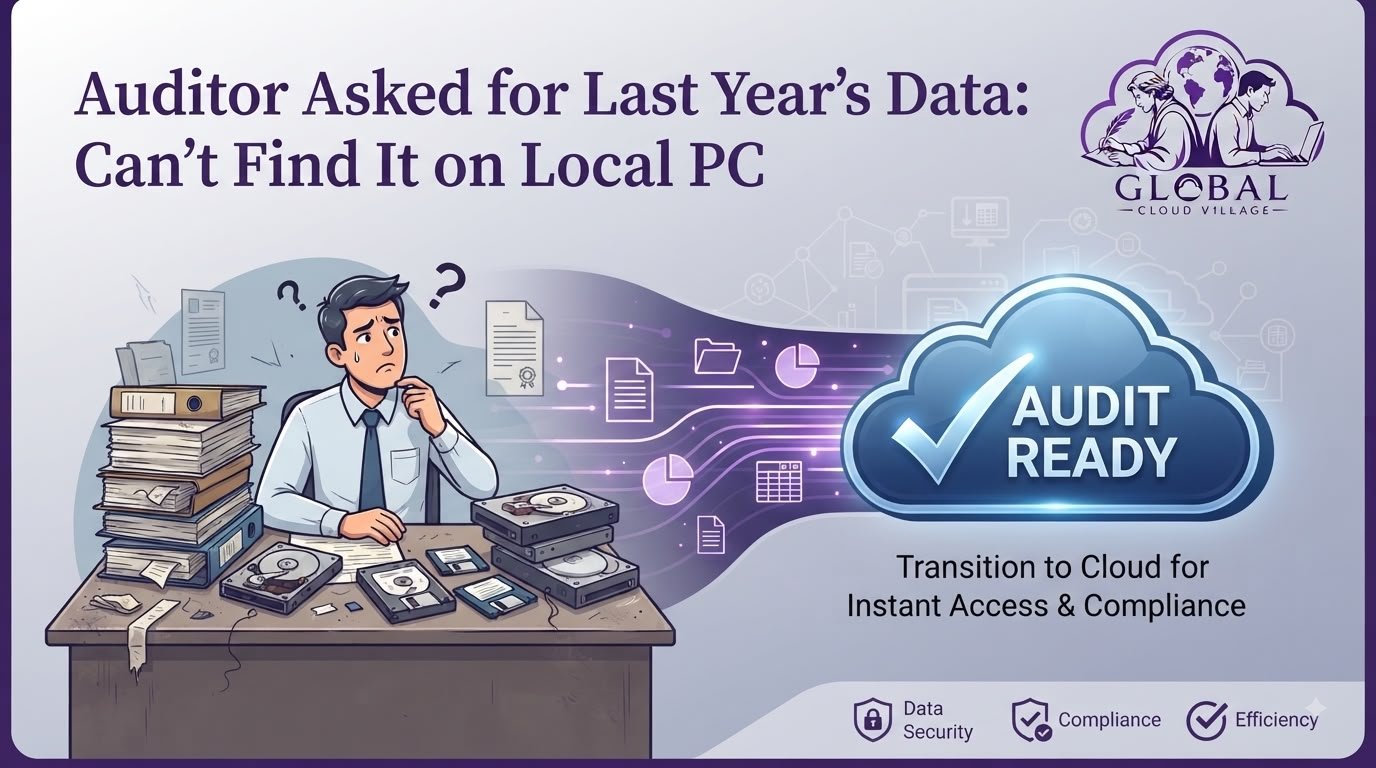
The lead auditor makes a straightforward request: they need to review last year’s detailed expense ledgers, vendor contracts, payroll records, invoices, and supporting documentation.
What should take five minutes turns into a stressful multi-day treasure hunt.
Your team searches office desktops, digs through unorganized local folders, checks external hard drives, and asks former employees where certain files were saved.
Eventually, someone remembers that an important spreadsheet may be sitting on an old computer that has not been switched on for months.
This is exactly the kind of situation that SME Audit Data Readiness Cloud planning is designed to prevent.
For small and medium-sized businesses, historical records should not depend on one employee remembering which computer contains a particular document.
Financial records need to be organized, protected, retrievable, and governed throughout their required retention period.
A centralized cloud document management strategy can make historical information easier to locate while giving management greater control over permissions, versions, backups, and access.
Why SME Audit Data Readiness Cloud Matters
An audit request should trigger a retrieval process, not a company-wide treasure hunt.
When records are distributed across personal computers, email inboxes, USB drives, paper cabinets, and disconnected spreadsheets, the business creates unnecessary operational risk.
A strong SME Audit Data Readiness Cloud strategy brings these records into a structured information environment.
The objective is simple:
When an auditor asks for a document, your team should know where it is, who can access it, and which version is the authoritative record.
This is especially important because auditors do not simply need documents to exist.
They need evidence that is sufficiently reliable and appropriate for the audit.
For example, PCAOB standards state that audit evidence can include information in electronic form and that the reliability of company-produced electronic information depends in part on controls over that information.
The Hidden Compliance Trap of Local Document Storage
Relying on decentralized local computers and fragmented folders creates several vulnerabilities.
Fragmented Historical Archives
When employees save files locally across individual workstations, historical records can become difficult to locate when computers are replaced or employees leave.
A folder called:
Final Accounts
is not very useful if nobody knows which computer contains it.
A structured archive should instead provide predictable organization by:
- Fiscal year
- Department
- Document type
- Supplier
- Customer
- Project
- Transaction
- Record status
Costly Audit Delays
Every hour employees spend searching for invoices, contracts, receipts, and spreadsheets is time that could have been spent running the business.
Audit delays can also increase administrative workload for both internal teams and external auditors.
The problem becomes particularly expensive when the requested document requires several people to reconstruct its history.
Record Retention Risk
Businesses often have legal, tax, contractual, and regulatory obligations governing how long particular records must be retained.
These requirements differ by country and business type.
For example, the U.S. SEC has specific record-retention requirements for certain audit and review records, including electronic records.
That does not mean every SME worldwide follows the same retention period.
It means businesses need a documented retention policy based on the laws and regulations applicable to them.
The Cloud Storage Audit Solution
Moving enterprise records into a centralized cloud document management environment can transform the way an SME handles historical information.
The objective is not simply to “put everything online.”
The system should provide structure, security, access control, backup, and reliable retrieval.
Centralized Multi-Year Archives
Historical financial records can be organized by fiscal year and document category.
For example:
2026 → Finance → Expenses → Vendor Invoices
2025 → Finance → Payroll → Payroll Records
2024 → Tax → Returns → Supporting Documents
This structure makes historical retrieval much easier than searching across individual computers.
Searchable Historical Records
Modern document management platforms can use filenames, metadata, tags, and search functions to help users locate specific records.
Instead of opening dozens of folders, an employee can search for:
Vendor Name + Invoice Number + Fiscal Year
and quickly identify the relevant record.
Controlled Auditor Access
An external auditor may need access to specific records without receiving unrestricted access to the company’s entire document repository.
A properly configured cloud environment can support permission-based access.
Depending on the platform, businesses may provide controlled access to specific folders, documents, or reporting environments while keeping unrelated information restricted.
SME Audit Data Readiness Cloud: Build the Archive Before the Audit
The biggest mistake is waiting until the auditor arrives to organize historical records.
Audit readiness should be an ongoing process.
A well-designed SME Audit Data Readiness Cloud system should make record retrieval part of normal business operations.
1. Audit Your Existing Data Locations
Create an inventory of where business records currently exist.
Check:
- Employee computers
- Network drives
- External hard drives
- USB devices
- Email accounts
- Accounting software
- ERP systems
- Shared folders
- Paper archives
- Cloud storage accounts
You may discover that the same document exists in several places.
That is an opportunity to establish which version is authoritative.
2. Establish a Centralized Cloud Repository
Move appropriate historical and active records into a structured cloud document management environment.
The exact platform depends on your organization’s requirements.
Some businesses may use cloud storage alongside accounting software, while others may integrate document management with ERP or financial platforms such as Odoo or Zoho.
The important issue is not the brand.
It is the architecture.
The system should make records:
Accessible + Organized + Protected + Searchable + Controlled
3. Create a Standard Naming Convention
A consistent naming structure can dramatically improve retrieval.
For example:
2025_AP_VendorName_Invoice_00452.pdf
2025_Payroll_March_Final.xlsx
2024_Tax_Return_Corporate_Final.pdf
The exact naming convention can vary, but it should be documented and consistently applied.
4. Apply Metadata and Permissions
Folders alone are not always enough.
Use metadata where appropriate to identify:
- Fiscal year
- Department
- Document type
- Supplier
- Customer
- Confidentiality level
- Retention category
- Approval status
Then apply permissions according to job responsibilities.
5. Run a Mock Audit Test
Do not wait for the real auditor to discover weaknesses.
Ask your finance team:
“Find the December 2023 invoice for Vendor X.”
Then measure how long it takes.
Try another request:
“Find the signed employment contract for Employee Y from 2022.”
If the answer takes hours, the archive needs improvement.
The goal should be to turn historical retrieval into a repeatable process rather than an emergency exercise.
Protect Audit Records From Accidental Loss
Centralized storage improves organization, but centralization does not automatically equal protection.
Your SME Audit Data Readiness Cloud strategy should also include appropriate backup and recovery controls.
Important considerations include:
- Version history
- Access controls
- Multi-factor authentication
- Backup
- Retention policies
- Activity logging
- Recovery testing
- Encryption
- Administrator controls
The exact controls required will depend on the sensitivity of the records and the organization’s regulatory obligations.
For audit evidence, controls matter because electronic information must be sufficiently reliable and complete for its intended purpose. PCAOB standards specifically emphasize evaluating the accuracy, completeness, and reliability of electronically maintained information.
The Audit Readiness Workflow
A traditional workflow often looks like this:
Auditor Request → Ask Employees → Search Local PCs → Search Email → Check Old Drives → Missing Document → Delayed Response
A cloud-based workflow can instead look like this:
Auditor Request → Search Central Repository → Verify Record → Apply Permission → Securely Share → Audit Response
The difference is not merely technological.
It is operational.
The second workflow creates a repeatable process that does not depend on one employee’s memory.
Auditor Access Without Exposing Everything
One of the biggest concerns SMEs have about cloud storage is confidentiality.
An auditor may need access to financial records, but that does not mean they should have access to:
- HR records outside the audit scope
- Personal employee information
- Unrelated customer data
- Internal strategy documents
- Passwords
- Management communications
- Unrelated business units
Permission-based access can help separate these information categories.
For example, an auditor could receive access to:
Finance → 2025 → Expenses
without receiving access to:
HR → Employee Medical Records
The specific controls available depend on the platform being used.
Digital Records and Audit Evidence
Digital records can form part of an audit evidence environment, but businesses should not assume that simply storing a PDF in the cloud makes it automatically sufficient for every audit or regulatory purpose.
Auditors consider the nature, source, relevance, and reliability of evidence.
PCAOB guidance states that information produced by a company electronically can be more reliable when effective IT general controls and application controls are operating.
PCAOB standards also recognize audit documentation in electronic form and require documentation to be sufficiently organized and detailed to support audit conclusions.
For SMEs, the practical lesson is straightforward:
Do not just store records. Build controls around the records.
The Audit Readiness Comparison
| Operational Factor | Local Desktop Storage | Centralized Cloud Document Management |
| Record Retrieval | Employees search multiple computers and folders | Centralized search and structured categories |
| Historical Records | Vulnerable to hardware failure and staff turnover | Centralized and easier to manage |
| Version Control | Multiple copies can create confusion | Version history can identify document changes |
| Auditor Access | Email attachments or physical documents | Permission-controlled digital access |
| Backup | Often dependent on manual processes | Can be automated depending on platform |
| Access Management | Difficult to manage across individual devices | Centralized permissions and user controls |
| Audit Preparation | Reactive and time-consuming | Continuous and structured |
| Business Benefit | High administrative friction | Faster retrieval and better information governance |
How to Build an SME Audit Data Readiness Cloud Strategy
A practical implementation can be divided into four stages.
Stage 1: Discover
Identify every location where financial and operational records are stored.
Stage 2: Organize
Create a standardized structure based on fiscal year, department, record type, and retention requirements.
Stage 3: Protect
Apply access controls, authentication, backup, versioning, and appropriate retention policies.
Stage 4: Test
Conduct mock audit requests and recovery tests.
If your team can retrieve a three-year-old invoice quickly without knowing which employee originally created it, your system is moving in the right direction.
Conclusion: Modernize Your Archives Before the Auditor Arrives
An auditor asking for last year’s financial data should not create a company-wide emergency.
If your team has to search local computers, old hard drives, employee inboxes, and forgotten folders every time someone requests a historical document, your information architecture is creating unnecessary risk.
A strong SME Audit Data Readiness Cloud strategy changes that.
Centralized records.
Consistent naming.
Searchable metadata.
Controlled access.
Reliable backups.
Documented retention.
Regular testing.
Together, these practices create a more organized and resilient information environment.
The objective is not to promise that every audit will be effortless.
The objective is to ensure that when an auditor asks:
“Can you provide last year’s records?”
your team can confidently answer:
“Yes. We know exactly where they are.”
Frequently Asked Questions About SME Audit Data Readiness Cloud
Are Digital Cloud Records Accepted by Auditors?
Electronic records can be used as audit evidence, but acceptance depends on the applicable audit standards, laws, regulations, and the reliability of the records and controls surrounding them.
For example, PCAOB standards explicitly recognize electronic information and require auditors to consider its relevance and reliability.
SMEs should therefore confirm specific retention and evidence requirements with their auditor and relevant local authorities.
How Should We Organize Several Years of Messy Files Before Moving Them to the Cloud?
Start with a data inventory.
Group records by fiscal year and then create logical categories such as:
- Finance
- Tax
- Payroll
- Vendors
- Customers
- Contracts
- Banking
- Legal
Then establish naming conventions, remove unnecessary duplicates, and identify records subject to retention requirements before migration.
Can We Restrict Auditors From Seeing Sensitive Files Outside Their Scope?
Yes, many cloud document platforms provide permission and access-control capabilities.
The specific implementation depends on the platform.
Create a dedicated audit-access structure and grant only the minimum permissions required for the engagement.
How Long Should an SME Keep Financial Records?
There is no single global retention period.
Requirements vary by country, tax authority, industry, company structure, and type of record.
Businesses should create a documented retention policy based on the requirements applicable to their jurisdiction and industry.
Does Cloud Storage Replace Backup?
No.
Cloud document storage and backup serve different purposes.
A business should determine whether its cloud platform provides adequate versioning, recovery, retention, and backup capabilities or whether an additional backup solution is required.
Scale Your Enterprise Infrastructure With Greater Clarity
Eliminating administrative bottlenecks and modernizing your information architecture can help SMEs build a more organized, resilient, and scalable operation.
Technology should not simply store your information.
It should help your team find, protect, manage, and use that information when it matters most.
Get your copy of Global Cloud Village and 4 Day Work Week on Amazon:
For more publications and resources, explore the Amazon Author Profile.
About the Author: Global Cloud Village
Global Cloud Village translates complex digital technology systems into clear, human-centric strategies for growing SMEs, founders, and industry leaders.
We help businesses replace fragmented legacy processes with practical cloud architectures, automation, digital transformation, and operational strategies that support sustainable growth.
Explore more business optimization insights at Global Cloud Village.