For small and medium-sized enterprises (SMEs), ransomware is no longer a problem that can simply be dismissed as a threat facing large corporations. A successful attack can interrupt operations, expose sensitive information, create recovery costs, and put significant pressure on a small organization.
The problem becomes even more serious when critical business information exists primarily on local servers, employee computers, or poorly protected backups.
This is why SME Ransomware Cloud Protection should be part of every modern business continuity strategy.
Moving appropriate workloads to secure cloud infrastructure can reduce dependence on vulnerable local hardware while improving access control, backup capabilities, monitoring, and recovery options.
However, cloud migration alone does not make a business ransomware-proof.
The real objective is to build multiple layers of protection so that one compromised account, computer, or application does not bring the entire organization to a standstill.

Why SME Ransomware Cloud Protection Matters in 2026
Modern SMEs increasingly depend on digital systems for everyday operations.
A single business may have:
- Accounting systems
- Customer databases
- Inventory systems
- HR records
- Contracts
- Project files
- Sales information
- Payment records
- Internal documents
If these systems are connected and inadequately protected, a single compromised account or device can become an entry point into the wider environment.
SME Ransomware Cloud Protection focuses on reducing that exposure while ensuring the organization has reliable recovery options.
The goal is not simply to prevent an attack.
The goal is to ensure that an attack does not become a business-ending event.
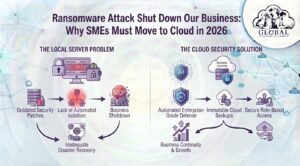
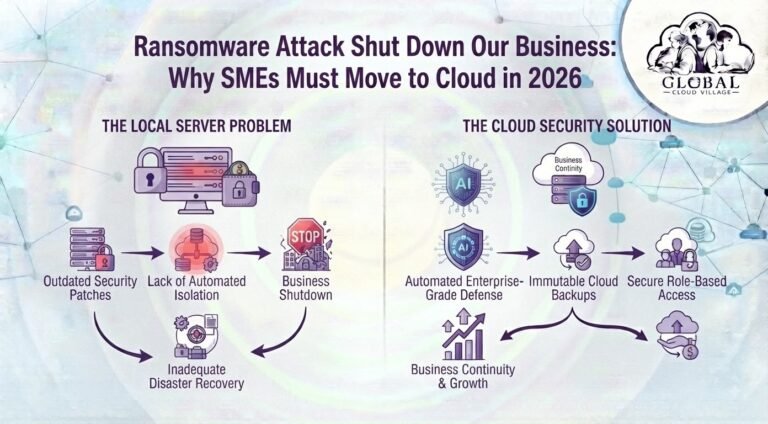
Why Local Servers Can Increase Ransomware Risk
Traditional on-premise infrastructure is not inherently insecure.
However, it requires organizations to manage many security responsibilities themselves.
For an SME with limited IT resources, that can create several vulnerabilities.
Outdated Security Patches
Local servers require consistent maintenance.
Operating systems, applications, security software, firewalls, and other infrastructure components need appropriate updates and configuration.
When critical patches are missed, attackers may exploit known vulnerabilities.
Lateral Movement Across the Network
If an employee’s computer becomes infected and the network is poorly segmented, attackers may attempt to move from that endpoint into other systems.
This can turn one compromised workstation into a much larger incident.
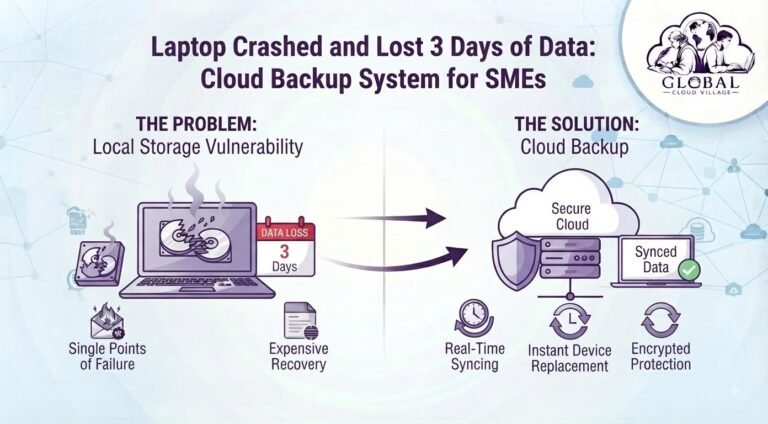
Backups Stored Too Close to Production Systems
Some SMEs maintain backups on external drives, network shares, or other systems connected to the same environment.
If ransomware gains sufficient access, those backups may also be deleted or encrypted.
A backup that cannot be recovered is not an effective recovery strategy.
The Ransomware Risk Chain
A poorly protected environment can follow this pattern:
Phishing or Vulnerability → Compromised Account/Device → Network Access → Ransomware Deployment → Data Encryption/Exfiltration → Business Disruption
A resilient environment aims to break this chain at multiple points:
MFA → Endpoint Protection → Access Controls → Segmentation → Protected Backups → Tested Recovery
This layered approach is more realistic than relying on one technology to stop every attack.
The Cloud Security Solution for SMEs
Moving suitable business workloads to a reputable cloud environment can provide security capabilities that may be difficult for a small organization to implement independently.
Platforms and services from providers such as Microsoft, Google, Amazon, Odoo, Zoho, and other cloud vendors offer different combinations of identity management, monitoring, access control, storage, backup, and security capabilities.
The specific controls available depend on the provider and subscription.
Managed Security Infrastructure
Major cloud providers invest heavily in infrastructure security, monitoring, physical security, and threat detection.
This can reduce the infrastructure burden placed on an SME.
However, the customer remains responsible for configuring its accounts and services securely.
Cloud security is therefore a shared responsibility, not a guarantee of automatic protection.
Protected Backup and Recovery
One of the most important components of SME Ransomware Cloud Protection is maintaining recoverable copies of critical information.
A strong backup strategy should consider:
- Backup frequency
- Retention
- Version history
- Isolation
- Access controls
- Encryption
- Recovery procedures
- Regular recovery testing
Where supported, immutable or protected backup copies can make it significantly harder for attackers to destroy every recovery point.
Strong Identity and Access Controls
A compromised password can become a serious security problem.
Cloud platforms can support stronger identity controls such as:
- Multi-factor authentication
- Role-based access
- Conditional access
- Privileged account controls
- Login monitoring
Reducing unnecessary access limits the potential impact of compromised accounts.
Step-by-Step Blueprint for SME Ransomware Cloud Protection
1. Audit Your Current Infrastructure
Identify where your critical business information currently lives.
Check:
- Local servers
- Desktop computers
- Employee laptops
- Network drives
- External hard drives
- Cloud applications
- Email systems
- Accounting platforms
- Customer databases
Create an inventory before deciding what should be migrated.
2. Identify Your Most Critical Data
Not every file has the same business value.
Prioritize:
Financial records
Customer databases
Contracts
Employee information
Sales records
Inventory data
Operational documentation
Intellectual property
Determine which systems the business cannot operate without.
3. Implement Multi-Factor Authentication
Enable MFA for all appropriate users, particularly:
- Administrators
- Finance staff
- IT administrators
- Senior management
- External support accounts
Do not rely solely on passwords for sensitive business systems.
4. Migrate Appropriate Workloads to the Cloud
Move suitable applications and data to secure cloud platforms based on business requirements.
Cloud migration should be planned rather than treated as a simple copy-and-paste exercise.
Consider:
- Data classification
- Permissions
- Integration
- Backup
- Compliance
- Recovery requirements
- User training
5. Establish Protected Backups
Maintain recoverable copies of critical information that attackers cannot easily modify or delete.
Where possible, use appropriate isolation and immutable or protected storage features.
6. Test Recovery
A backup is only useful if you can restore it.
Perform recovery tests regularly.
Try restoring:
- A deleted document
- A previous file version
- A critical database
- A complete application environment
Document how long recovery takes.
7. Train Employees
Technology cannot eliminate every ransomware entry point.
Employees should understand how to identify:
- Suspicious emails
- Unexpected attachments
- Fake login pages
- Unusual payment requests
- Suspicious links
- Social engineering attempts
Training should be continuous rather than a one-time presentation.
The Cybersecurity Comparison Matrix
| Security Factor | Traditional On-Premise Infrastructure | Modern Cloud-Based Infrastructure | Risk Reduction Benefit |
| Security Maintenance | SME responsible for infrastructure maintenance and patching | Provider manages underlying infrastructure while customers manage their configurations | Reduced infrastructure burden |
| Identity Security | Often dependent on local accounts and passwords | MFA and centralized identity controls may be available | Stronger account protection |
| Backup | May depend on manual or local backups | Automated backup options may be available | More consistent recovery capability |
| Backup Isolation | Backups may remain connected to local systems | Cloud services can support isolated or protected backup architectures | Greater ransomware resilience |
| Remote Access | Often dependent on VPN or local infrastructure | Secure cloud access can support distributed teams | Better business continuity |
| Monitoring | Limited by internal IT resources | Cloud services may provide extensive monitoring capabilities | Greater security visibility |
| Recovery | Potentially dependent on physical infrastructure | Cloud-based recovery options may accelerate restoration | Reduced downtime |
Cloud Migration Does Not Mean Automatic Ransomware Protection
One of the biggest misconceptions about cloud security is that simply moving files from a local computer to the cloud eliminates ransomware.
It does not.
A compromised cloud account can still expose data.
Poorly configured permissions can still create vulnerabilities.
Malware can still affect synchronized files.
Weak passwords can still be compromised.
This is why SME Ransomware Cloud Protection must be treated as a complete security strategy rather than a simple cloud migration project.
Your security model should combine:
Identity Protection
MFA
Endpoint Security
Access Control
Backup
Monitoring
Employee Training
Incident Response
Recovery Testing
Cloud infrastructure becomes one important component of that strategy.
What SMEs Should Do After a Ransomware Attack
If ransomware is suspected, do not immediately assume that paying the ransom is the best solution.
The priority should be containing the incident and protecting remaining systems.
Depending on the situation:
- Isolate affected devices where appropriate.
- Avoid unnecessarily spreading the infection.
- Contact your IT or cybersecurity provider.
- Preserve relevant evidence.
- Identify what systems and accounts were affected.
- Determine whether data was encrypted, stolen, or both.
- Assess available clean backups.
- Restore systems using a controlled recovery process.
- Review compromised credentials and access.
- Report the incident where required by applicable laws or regulations.
Incident response should ideally be planned before the attack occurs.
How Much Does Ransomware Really Cost an SME?
The ransom demand is only one potential cost.
A ransomware incident can also generate:
- Employee downtime
- Lost sales
- Customer disruption
- IT recovery costs
- Forensic investigation
- Legal expenses
- Regulatory obligations
- Reputation damage
- Data restoration costs
- Lost business opportunities
This is why focusing exclusively on the ransom amount can produce a misleading picture of the financial risk.
The real question is:
How much would it cost if your business could not access its critical systems for several days?
That number should influence your cybersecurity and recovery investment.
Build a Ransomware-Resilient SME
A resilient business does not assume that an attack will never happen.
It prepares for the possibility that something will eventually go wrong.
Your ransomware readiness checklist should include:
Critical systems identified
Important data classified
MFA enabled
Administrative accounts protected
Endpoint security deployed
Cloud permissions reviewed
Backups automated
Recovery copies protected
Backup restoration tested
Employees trained
Incident response documented
Emergency contacts maintained
Business continuity procedures tested
This turns cybersecurity from a reactive expense into an operational capability.
Frequently Asked Questions About SME Ransomware Cloud Protection
Are Cloud Platforms Safer From Ransomware Than Office Servers?
Cloud platforms can provide advanced infrastructure security and security management capabilities that may be difficult for SMEs to implement independently.
However, cloud services are not automatically immune to ransomware.
Secure configuration, identity protection, endpoint security, backup, monitoring, and recovery planning remain essential.
What Should We Do If Our Local Server Is Already Vulnerable?
Start with a security assessment.
Prioritize critical vulnerabilities, enable MFA where possible, review administrative accounts, verify backups, and determine which workloads can be migrated or modernized.
Avoid rushing into migration without understanding your current data and application dependencies.
Can Ransomware Affect Cloud Files?
Yes.
Cloud-synchronized files and compromised cloud accounts can still be affected.
This is why businesses should maintain appropriate versioning, retention, backup, access controls, and recovery mechanisms.
Should an SME Completely Abandon Local Servers?
Not necessarily.
Some businesses have legitimate reasons to maintain on-premise infrastructure.
The better question is whether each workload is being hosted in the environment that provides the appropriate balance of security, cost, performance, compliance, and operational resilience.
Is Cloud Migration Enough to Protect an SME?
No.
Cloud migration can improve infrastructure resilience, but it is only one component of a broader cybersecurity strategy.
Identity security, MFA, endpoint protection, backup, employee awareness, monitoring, and incident response remain important.
Scale Your Enterprise Infrastructure With Greater Clarity
Ransomware does not need to destroy your business to become expensive.
A few days without access to accounting, customer records, email, inventory, or critical documents can create serious operational and financial consequences for an SME.
SME Ransomware Cloud Protection is therefore not simply about moving files to the cloud.
It is about building a business environment where an individual compromised device or account does not automatically become a company-wide disaster.
Modernize the infrastructure.
Protect identities.
Separate critical backups.
Test recovery.
Train your employees.
And make sure your business can continue operating even when something goes wrong.
Get your copy of Global Cloud Village and 4 Day Work Week on Amazon:
For more publications and resources, explore the Amazon Author Profile.
About the Author: Global Cloud Village
Global Cloud Village translates complex digital technology systems into clear, human-centric strategies for growing SMEs, founders, and industry leaders.
We help businesses replace fragmented legacy processes with practical cloud architectures, automation, digital transformation, and operational strategies designed to support sustainable growth.
Explore more business optimization insights at globalcloudvillage.com.