It is the most stressful time of the fiscal calendar.
Your accounting team is compiling final receipts, reconciling bank statements, checking invoices, and preparing financial schedules for an approaching tax filing deadline.
Then, without warning, the office computer freezes.
The screen goes black.
The hard drive fails.
Suddenly, years of financial records that existed primarily on one physical machine may become inaccessible.
For small and medium-sized enterprises (SMEs), this can turn an ordinary tax deadline into a serious operational crisis.
Financial records, vendor invoices, receipts, payroll documentation, accounting spreadsheets, and historical ledgers can represent years of business activity.
If those records exist only on a local computer or external hard drive, a hardware failure can create unnecessary recovery costs, delays, and compliance pressure.
This is where Cloud Storage Tax Document Protection becomes valuable.
By moving important financial records into an appropriately configured cloud storage and backup environment, SMEs can reduce their dependence on a single physical device and make important documents easier to access, protect, organize, and recover.

Why Cloud Storage Tax Document Protection Matters
Tax preparation requires reliable access to historical financial information.
Your accountant may need:
- Previous tax returns
- Purchase invoices
- Sales invoices
- Bank statements
- Expense receipts
- Payroll records
- Vendor contracts
- Financial reports
- Accounting spreadsheets
- Supporting documentation
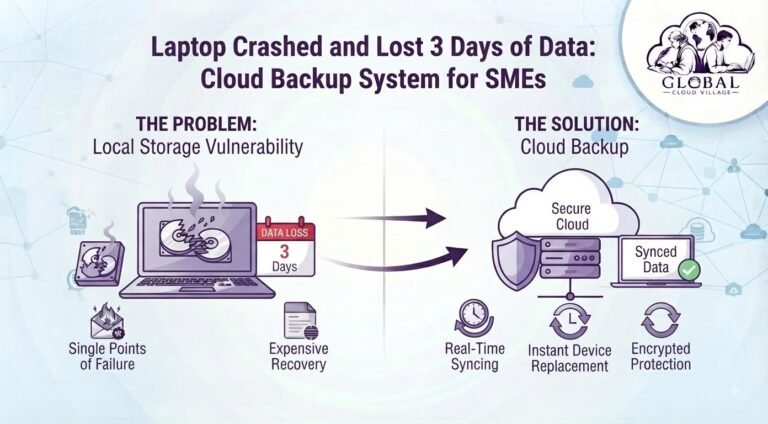
If these records are stored only on one office computer, the business has created a single point of failure.
The problem is not simply that a hard drive might fail.
The bigger problem is that the business may not have another reliable copy.
A properly designed Cloud Storage Tax Document Protection strategy provides an additional layer of resilience by keeping appropriate copies of important information outside the physical device.
The Dangerous Vulnerability of Local Financial Storage
Keeping vital financial documents exclusively on local computers and external drives creates several operational risks.
Single Hardware Point of Failure
Every hard drive eventually faces the possibility of failure.
Mechanical drives can experience physical problems, while solid-state drives can also fail without warning.
If the only copy of your tax records exists on the failed device, recovery may require specialist data recovery services.
Even then, successful recovery is not guaranteed.
Last-Minute Filing Delays
A failed computer can interrupt the tax preparation process at exactly the wrong time.
Your accounting team may suddenly have to search for:
- Missing receipts
- Historical invoices
- Bank records
- Expense reports
- Payroll documents
Instead of focusing on filing, employees are forced to reconstruct information.
Limited Remote Access
Modern accounting teams may include external accountants, consultants, finance managers, and remote employees.
If financial records are trapped on a computer inside the office, collaboration becomes unnecessarily difficult.
A properly secured cloud environment can provide authorized users with access from approved locations and devices.
The Tax Data Failure Chain
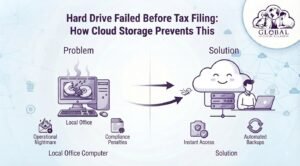
A traditional setup can look like this:
Local Accounting Computer → Hard Drive Failure → Financial Records Inaccessible → Tax Preparation Delayed → Compliance & Financial Pressure
A more resilient setup can look like:
Cloud-Based Financial Records → Automated Protection → Secure Remote Access → Data Recovery Capability → Better Tax Filing Preparedness
The difference is preparation.
The Cloud Storage Tax Document Protection Solution
Moving financial records to the cloud can provide significant resilience benefits when implemented correctly.
Automated Data Protection
Cloud platforms and dedicated backup systems can automate the protection of business information.
This reduces dependence on someone remembering to manually copy files to an external drive.
However, businesses should distinguish between cloud synchronization and true backup.
Synchronization can replicate deletions or unwanted changes.
A proper backup strategy should consider version history, retention, recovery, and protection against accidental deletion or corruption.
Centralized Financial Records
Instead of having tax documents scattered across individual computers, businesses can organize financial information within a structured cloud environment.
For example:
2026
→ Tax Documents
→ Invoices
→ Bank Statements
→ Payroll
→ Expenses
→ Vendor Records
This makes historical information easier to locate when accountants or auditors request it.
Secure Accountant Access
A cloud environment can allow authorized accountants or consultants to access required records without physically accessing the office computer.
Access should be controlled using:
- User permissions
- MFA
- Secure sharing
- Role-based access
- Appropriate retention policies
The objective is to provide access without giving external parties unnecessary visibility into unrelated company information.
Version History and Recovery
Where supported, cloud platforms can maintain previous versions of files.
This can be particularly useful when a spreadsheet is accidentally overwritten or a document is changed incorrectly.
However, version history should not automatically be considered a complete backup strategy.
Businesses should establish appropriate retention and recovery requirements.
Step-by-Step Blueprint for Cloud Storage Tax Document Protection
1. Audit Your Current Financial Storage
Identify every location where tax-related documents currently exist.
Check:
- Office computers
- External hard drives
- USB drives
- Network folders
- Email attachments
- Accounting applications
- Paper archives
- Employee laptops
You may discover that your financial records are far more fragmented than expected.
2. Classify Your Financial Documents
Separate documents according to their business importance.
For example:
Tax Records
Invoices
Receipts
Payroll
Bank Statements
Vendor Documentation
Contracts
Financial Reports
This makes it easier to establish consistent storage and retention policies.
3. Move Critical Records to a Centralized Cloud Environment
Select an appropriate cloud storage, accounting, ERP, or document management platform.
The platform should support the organization’s requirements for:
- Security
- Permissions
- Search
- Retention
- Backup
- Collaboration
- Recovery
Do not select a platform simply because it offers cloud storage.
Evaluate the complete data lifecycle.
4. Establish Automated Backup Protection
Configure an appropriate backup schedule for critical financial information.
The required frequency depends on how frequently the information changes and how much data the business can afford to lose.
5. Protect Access With MFA
Financial records contain sensitive information.
Use strong authentication and MFA for employees and external users who require access.
Avoid sharing a single accounting or storage password between multiple people.
6. Establish a Document Naming Convention
A simple naming convention can dramatically improve retrieval.
For example:
2026-03-15_VendorName_Invoice_1254.pdf
or:
2026_Tax_Expenses_March.xlsx
The objective is to make documents easy to identify without opening multiple files.
7. Run a Pre-Tax Recovery Test
Do not wait until tax season to discover that your backup process does not work.
Select several historical records and test whether your team can retrieve them.
Try:
A three-year-old invoice
A previous tax document
A payroll report
A bank statement
An expense receipt
Measure how long retrieval takes.
If employees cannot find the documents during a controlled test, the system needs improvement before a real emergency occurs.
The Financial Storage Comparison Matrix
| Operational Factor | Local Hard Drives / Office Desktop | Modern Cloud Storage & Backup | Tax & Compliance Benefit |
| Data Resilience | Vulnerable to hardware failure | Protected copies can be maintained separately | Reduced dependence on one device |
| Document Retrieval | Often dependent on local folders | Centralized search and organization | Faster access to historical records |
| Remote Access | Limited to physical devices or remote-access setups | Secure access can be provided to authorized users | Easier accountant collaboration |
| Version Recovery | Depends on manual backups | Supported platforms may provide version history | Easier recovery from accidental changes |
| Backup | Often manual | Can be automated depending on the service | More consistent data protection |
| Collaboration | Files may be emailed between users | Controlled cloud sharing | Less duplication and fewer file conflicts |
| Hardware Risk | High dependence on physical devices | Reduced dependence on individual computers | Greater operational resilience |
Cloud Storage Is Not a Replacement for Every Financial Control
Moving tax documents to the cloud does not automatically make a company compliant.
Financial records may be subject to specific requirements regarding:
- Retention
- Authenticity
- Accessibility
- Privacy
- Auditability
- Data location
- Legal preservation
Businesses should determine the requirements that apply to their jurisdiction and industry.
Cloud storage should support those requirements rather than replace proper financial governance.
Protect Financial Records Before Tax Season
The worst time to discover a missing backup is when your accountant asks for the document tomorrow.
The best time to test your recovery process is before the deadline.
Create a simple annual readiness process:
Review storage
→ Verify backups
→ Test recovery
→ Check permissions
→ Review retention
→ Confirm accountant access
→ Begin tax preparation
This turns tax readiness into a process rather than a last-minute emergency.
The Hidden Cost of a Hard Drive Failure
The cost of a failed hard drive is not simply the price of replacing the hardware.
Consider the potential cost of:
- Employee downtime
- Data recovery services
- Delayed tax preparation
- Accountant delays
- Reconstructing missing records
- Lost historical information
- Business interruption
- Compliance problems
For an SME, the secondary costs can easily exceed the cost of maintaining appropriate cloud storage and backup protection.
Build a Tax Document Protection Checklist
Before the next tax filing period, verify:
All financial records have identified storage locations
Critical documents are not stored exclusively on one computer
Cloud storage permissions are reviewed
MFA is enabled for sensitive accounts
Automated backups are configured where appropriate
Backup retention is documented
Important documents have been digitized
Historical records are organized
Accountants have appropriate authorized access
Old files can be retrieved quickly
Recovery has been tested
Financial records are retained according to applicable requirements
This simple checklist can prevent a last-minute data recovery crisis.
Conclusion: Protect Your Tax Records Before the Hard Drive Fails
A hard drive failure before tax filing can turn a routine financial deadline into a stressful data recovery emergency.
The underlying problem is not the hard drive itself.
It is the dependence on a single physical location for information that the business cannot afford to lose.
Cloud Storage Tax Document Protection gives SMEs a practical way to reduce that dependency.
By centralizing financial records, implementing appropriate cloud backups, controlling access, organizing documents, and regularly testing recovery, businesses can improve their readiness for tax season and unexpected hardware failures.
Your accountant should be spending time preparing your taxes.
They should not be spending days trying to recover files from a dead computer.
Protect the records before the deadline arrives.
Frequently Asked Questions About Cloud Tax Storage
Are Digital Cloud Records Accepted by Tax Authorities?
Digital records may be accepted in many jurisdictions, but the exact requirements depend on the applicable tax authority, country, industry, and type of document.
Businesses should verify the specific retention, authenticity, accessibility, and record-keeping requirements that apply to them.
How Do We Protect Sensitive Financial Data Stored in the Cloud?
Use a reputable provider and configure appropriate security controls.
These may include:
- MFA
- Role-based access
- Encryption
- Strong passwords
- Access monitoring
- Backup protection
- Data retention policies
Security also depends on how the business configures and manages the platform.
What Should We Do If Our Tax Documents Are Scattered Across Local Folders?
Start by creating a complete inventory.
Identify where the documents are stored, remove unnecessary duplicates, establish a consistent folder structure, and move important records into an appropriately secured centralized environment.
Do not delete the original files until you have verified that the migration and backup process is working correctly.
Is Cloud Synchronization the Same as Cloud Backup?
No.
Synchronization keeps files aligned between locations.
Backup is designed to provide recoverable copies of data.
A strong financial data protection strategy should evaluate version history, retention, backup, and recovery separately.
How Often Should We Test Our Financial Data Recovery?
The appropriate frequency depends on how critical the records are and how frequently they change.
At minimum, businesses should periodically test whether important historical records can actually be retrieved and restored.
Testing before tax season is particularly useful.
Can Accountants Access Our Financial Records Remotely?
Yes, many cloud platforms support controlled remote access.
However, external accountants should receive only the permissions they require, with appropriate authentication and access controls.
Scale Your Enterprise Infrastructure With Greater Clarity
Eliminating data vulnerabilities and modernizing your financial technology stack can help your SME build a more resilient and efficient operation.
The objective is not simply to put files in the cloud.
It is to create a structured financial information environment where records are protected, organized, accessible, and recoverable when the business needs them.
Get your copy of Global Cloud Village and 4 Day Work Week on Amazon:
For more publications and resources, explore the Amazon Author Profile.
About the Author: Global Cloud Village
Global Cloud Village translates complex digital technology systems into clear, human-centric strategies for growing SMEs, founders, and industry leaders.
We help businesses replace clunky, fragmented legacy processes with practical cloud architectures, automation, digital transformation, and operational strategies that support sustainable growth.
Explore more business optimization insights at globalcloudvillage.com.