SME Cloud Backup System: Laptop Crashed and Lost 3 Days of Data?
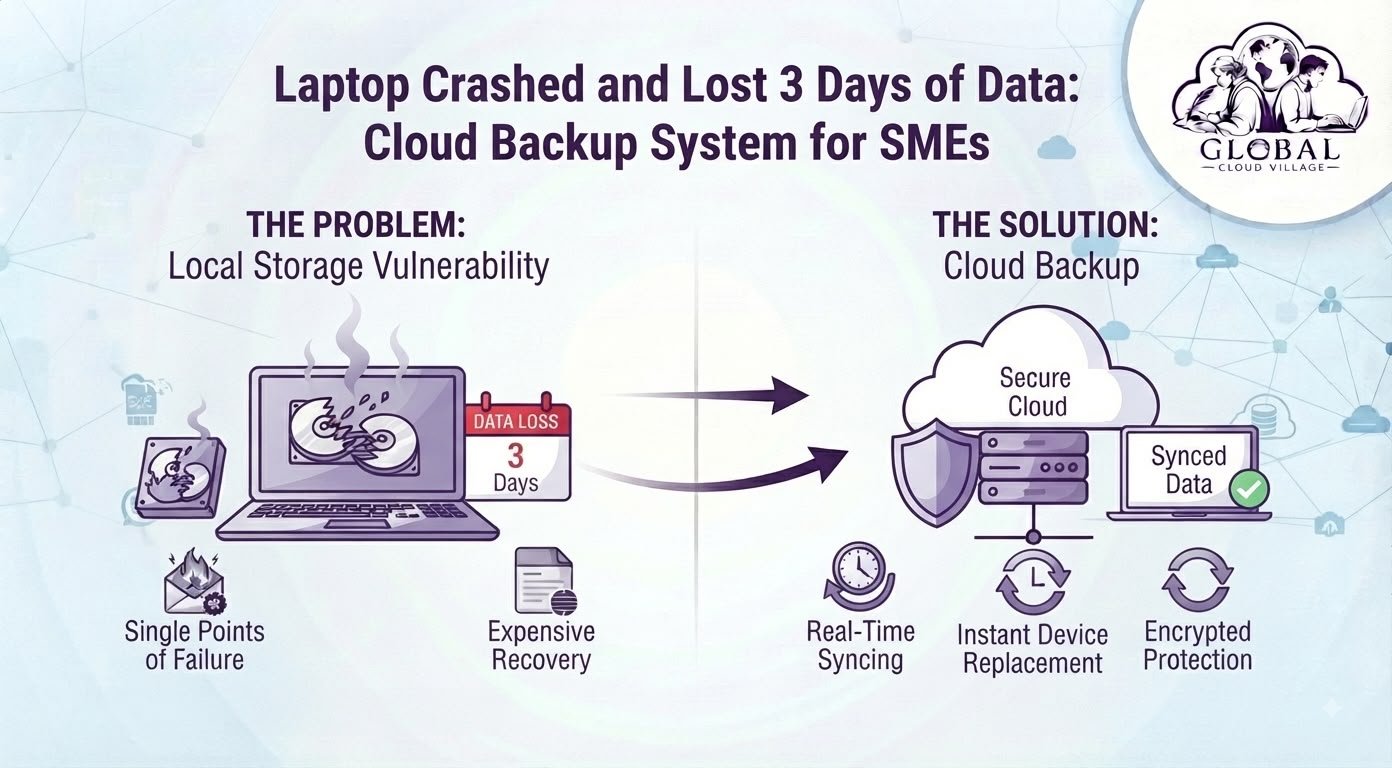
The blue screen appears without warning, followed immediately by a mandatory hardware reboot. When your lead accountant or project manager stares at a dead machine, the realization hits hard: three full days of unbacked financial entries, client proposals, and inventory records may be gone.
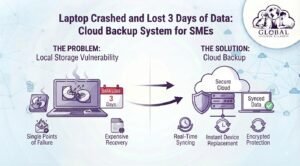
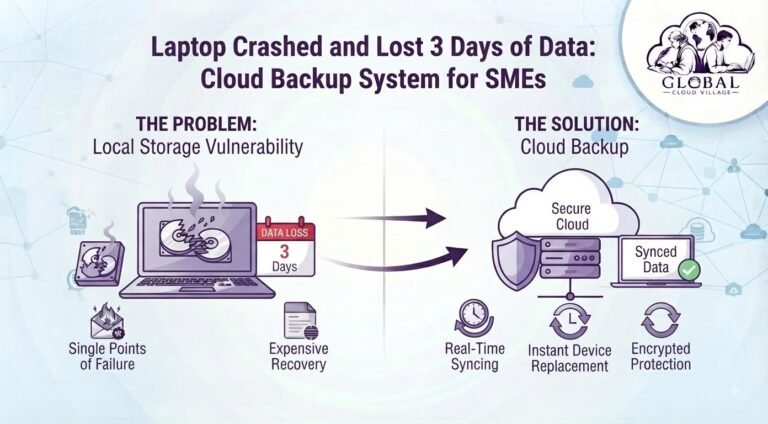
For small-to-medium enterprises (SMEs), relying on local machine storage is a serious business risk. Laptops fail, hard drives degrade, devices get damaged, and files can be accidentally deleted. When critical operational data exists only on a physical device, a simple hardware failure can quickly become an expensive business disruption.
A SME Cloud Backup System changes that equation by automatically protecting important business files away from individual devices. Instead of depending on one laptop or desktop, your business maintains secure copies that can be restored when hardware fails.
The objective is simple: lose the laptop, not the business data.
The Hidden Risk of Local Laptop Storage
Many SMEs still treat employee laptops as primary storage locations for important documents. This might work when a company has only a few employees and limited data, but it becomes increasingly dangerous as the business grows.
A typical laptop may contain:
- Client proposals
- Financial spreadsheets
- Invoices and receipts
- Sales reports
- Project documents
- Product information
- Vendor records
- HR documents
- Marketing assets
- Internal procedures
If these files exist only on one device, that device becomes a single point of failure.
1. Hardware Failure Can Stop Work
Hard drives and SSDs can fail without warning. Batteries, motherboards, screens, power components, and other hardware can also malfunction.
Even if the hardware itself can eventually be repaired, recovering the files may take time and require specialist assistance.
A SME Cloud Backup System removes the dependency on one physical machine by keeping protected copies of important business information away from the device.
2. Employees Lose Valuable Working Hours
When a laptop crashes, the cost is not limited to replacing hardware.
Employees may have to:
- Recreate documents
- Search old emails
- Request files from colleagues
- Rebuild spreadsheets
- Contact clients for previous versions
- Reconstruct financial records
- Wait for technical recovery
The real cost is lost productivity.
3. Local Files Create Version Problems
Local storage can also create a second problem: multiple versions of the same document.
You may eventually see files such as:
Proposal.docx
Proposal-Final.docx
Proposal-Final-2.docx
Proposal-Final-New.docx
Proposal-Final-New-Updated.docx
Without centralized storage and proper version history, employees can easily work on outdated information.
Why an SME Cloud Backup System Matters
A reliable SME Cloud Backup System is more than simply uploading files to the internet.
A properly designed backup environment should provide:
- Automated backups
- Version history
- Secure authentication
- Encryption
- Access controls
- Recovery options
- Off-device storage
- Regular backup testing
The important distinction is between cloud storage and cloud backup.
Cloud storage helps employees access and synchronize files.
Cloud backup is designed to provide recoverable copies of data when files are deleted, corrupted, lost, or affected by a hardware failure.
For many SMEs, combining secure cloud storage with a dedicated backup strategy provides much stronger protection than keeping files exclusively on employee laptops.
The Business Cost of Losing Three Days of Data
Imagine an employee has spent three days preparing an important client project.
The laptop suddenly fails.
The employee loses:
- 20 hours of work
- Client research
- Spreadsheet calculations
- Design revisions
- Meeting notes
- Internal documentation
Suppose the employee earns $25 per hour.
Twenty hours represents $500 of direct labor.
But the real cost can be significantly higher if the lost work causes:
- Missed deadlines
- Client dissatisfaction
- Delayed invoicing
- Repeated work
- Overtime
- Lost business opportunities
This is why the cost of prevention should be compared with the total cost of data loss, rather than simply the price of cloud storage.
How an SME Cloud Backup System Prevents Data Loss
A properly configured SME Cloud Backup System creates a protected copy of important business information independently from the employee’s physical device.
The workflow can look like this:
Employee Creates File → Cloud Sync → Protected Backup → Version History → Recovery Point
If the laptop fails, the business does not need to recreate everything from memory.
Instead, the employee can move to another authorized device and recover the required information.
Automated Background Protection
Employees should not have to remember to manually copy important files every Friday.
Manual backup processes are easily forgotten.
Automation is therefore one of the most important features of a modern SME Cloud Backup System.
Files can be synchronized or backed up according to the organization’s chosen policies, reducing dependence on employee discipline.
Version History
Accidental deletion does not always mean permanent loss.
Where version history and retention policies are properly configured, organizations may be able to recover earlier versions of documents.
This is especially valuable when an employee accidentally replaces a spreadsheet, deletes a project folder, or saves incorrect information over an existing file.
Secure Remote Recovery
If a laptop becomes unusable, an employee can access authorized files from another approved device.
This can dramatically reduce downtime.
Instead of waiting days for forensic recovery or manually reconstructing documents, the employee can continue working while the damaged hardware is repaired or replaced.
Cloud Backup Is Also an Operational Continuity Strategy
A SME Cloud Backup System should not be viewed only as an IT expense.
It is part of business continuity.
Consider a business where an accountant’s laptop contains the only copy of an important financial workbook.
If that laptop fails on Monday morning, the accounting workflow may stop.
Now consider the same scenario with centralized cloud storage and reliable backup.
The laptop fails.
The accountant signs into another authorized device.
The files are restored or synchronized.
Work continues.
The difference is not simply technology.
It is business resilience.
Step-by-Step Blueprint to Implement an SME Cloud Backup System
1. Audit Current Storage Habits
Start by identifying where important company data currently lives.
Ask your team:
- Which files are stored locally?
- Which files exist only on employee laptops?
- Are external USB drives being used?
- Are important documents being emailed between employees?
- Are backups performed manually?
- How frequently are backups tested?
You may discover that your business has far more single points of failure than expected.
2. Identify Critical Business Data
Not every file requires the same protection level.
Prioritize:
- Financial records
- Customer databases
- Contracts
- Accounting documents
- Sales information
- HR records
- Project files
- Business-critical spreadsheets
- Intellectual property
Create clear policies around what must be backed up and how long different categories of information should be retained.
3. Deploy Cloud Storage and Backup
Implement a centralized cloud environment appropriate to your business requirements.
Platforms such as Microsoft 365, Google Workspace, Odoo, Zoho, and other enterprise cloud ecosystems can form part of a broader cloud strategy.
The important point is not simply choosing a platform.
The system must be configured correctly for your organization’s security, access, retention, and recovery requirements.
4. Configure Automated Protection
Remove as much manual work as possible.
Your SME Cloud Backup System should operate automatically according to defined policies rather than depending on employees remembering to copy files.
5. Protect Administrative Accounts
Cloud backup itself must be protected.
Use:
- Multi-factor authentication
- Strong passwords
- Role-based permissions
- Limited administrator access
- Security monitoring
- Regular account reviews
A backup that anyone can access is not a strong backup strategy.
6. Test Recovery
This step is frequently overlooked.
Having a backup does not automatically mean you can successfully recover from it.
Run recovery tests periodically.
Select a sample file or folder and verify that your team can locate and restore it.
For critical systems, conduct more comprehensive disaster recovery exercises.
SME Cloud Backup System vs. Local Laptop Storage
| Operational Factor | Local Laptop Storage | SME Cloud Backup System | Business Benefit |
| Data Protection | Dependent on individual hardware | Protected copies stored separately | Reduced hardware failure risk |
| Recovery | Manual reconstruction or specialist recovery | Restore from available recovery points | Faster business recovery |
| Accessibility | Limited to the physical device | Available to authorized users from approved devices | Greater workforce flexibility |
| Version History | Often limited or unavailable | Can retain multiple versions depending on configuration | Easier recovery from mistakes |
| Administration | Managed individually | Centralized policies and controls | Better governance |
| Scalability | Becomes difficult as teams grow | Easier to expand with business requirements | Supports business growth |
What Makes a Good SME Cloud Backup System?
Not every cloud solution provides the same level of protection.
Before selecting a solution, SMEs should evaluate:
Automated Backup
The system should minimize manual intervention and provide scheduled or continuous protection where appropriate.
Version Retention
Check how many previous versions can be retained and for how long.
Security Controls
Look for encryption, MFA, access controls, administrator protections, and appropriate monitoring.
Recovery Options
Understand exactly how quickly individual files, folders, applications, or larger datasets can be restored.
Backup Independence
A backup should not simply replicate the same failure point. Consider whether backup copies are sufficiently isolated from primary systems.
Recovery Testing
Choose a system that allows your organization to regularly verify that backups can actually be restored.
For guidance on ransomware resilience and data protection practices, businesses can also review resources from the U.S. Cybersecurity and Infrastructure Security Agency (CISA).
The 3-2-1 Backup Principle
One useful concept for business backup planning is the 3-2-1 backup strategy.
The basic idea is to maintain:
3 copies of important data
2 different storage types or environments
1 copy stored off-site
The exact implementation should depend on your organization’s systems, risk profile, regulatory requirements, and recovery objectives.
The principle remains valuable because it prevents a single hardware failure from destroying every copy of your data.
A well-designed SME Cloud Backup System can become an important component of this broader strategy.
Common Mistakes SMEs Make With Cloud Backups
Mistake 1: Assuming Cloud Storage Automatically Means Backup
Synchronization and backup are not always the same thing.
If a file is accidentally deleted and that deletion synchronizes everywhere, you may need version history or a separate backup system to recover it.
Mistake 2: Never Testing Recovery
A backup that has never been tested should not be treated as a guaranteed recovery solution.
Mistake 3: Giving Everyone Administrator Access
Excessive permissions increase security risk.
Use the principle of least privilege wherever practical.
Mistake 4: Ignoring Departed Employees
Former employees should not retain access to company cloud systems.
Include cloud account deactivation and permission reviews in every employee offboarding process.
Mistake 5: Relying on One Backup Location
A single backup destination can become another single point of failure.
Consider geographic separation, isolation, retention, and recovery requirements when designing your architecture.
What Happens When an Employee’s Laptop Dies?
The traditional process looks like this:
Laptop Failure → Panic → IT Diagnosis → Data Recovery Attempt → Manual Reconstruction → Lost Productivity
A properly implemented SME Cloud Backup System can change the workflow:
Laptop Failure → Replace Device → Secure Login → Restore Files → Resume Work
The exact recovery time depends on the system, amount of data, connectivity, recovery method, and configuration.
The goal is not to promise instant recovery under every circumstance.
The goal is to make recovery planned, repeatable, and significantly less dependent on a single physical device.
Conclusion: Stop Letting One Laptop Hold Your Business Hostage
A laptop crash should be an IT inconvenience, not a business crisis.
When important financial records, client documents, project files, and operational information exist only on employee devices, your SME carries an unnecessary data-loss risk.
A properly configured SME Cloud Backup System creates another layer of protection by moving critical data away from individual hardware and making recovery part of your normal business continuity strategy.
The objective is simple:
Protect the data. Replace the device. Keep working.
Your employees should be able to lose a laptop without losing three days, three weeks, or three years of business information.
Frequently Asked Questions About SME Cloud Backup Systems
Is an SME Cloud Backup System suitable for small businesses?
Yes. Cloud backup can be scaled according to the number of users, devices, applications, and data volumes involved. SMEs can begin with their most critical information and expand protection as their requirements grow.
Is cloud backup better than keeping files on an external hard drive?
An external drive can be useful as part of a broader backup strategy, but it can be lost, damaged, stolen, or affected by the same physical disaster as the primary equipment. Off-site cloud protection provides an additional layer of resilience.
Can cloud backup recover accidentally deleted files?
Depending on the platform and retention configuration, previous versions or deleted files may be recoverable. Businesses should confirm the retention and recovery capabilities before selecting a solution.
Will employees still be able to work if their laptop breaks?
With appropriately configured cloud storage and backup, authorized employees can often access or restore their files from another device. The exact process depends on the cloud platform and recovery architecture.
How often should an SME test its backups?
Businesses should establish a regular recovery-testing schedule based on the importance of their data and their business continuity requirements. Critical systems should be tested more frequently and documented.
Is cloud backup enough to protect against ransomware?
Cloud backup can significantly improve recovery capability, but it should be part of a broader cybersecurity strategy that includes MFA, patching, endpoint protection, access controls, employee awareness, and tested recovery procedures.
Scale Your Enterprise Infrastructure With Absolute Clarity
Eliminating data vulnerability and modernizing your technology stack is the key to sustainable growth. Discover the complete blueprint for running a highly productive, streamlined business without unnecessary technical roadblocks.
Get your copy of Global Cloud Village and 4 Day Work Week on Amazon:
Explore the author’s Amazon profile:
About the Author: Global Cloud Village
Global Cloud Village translates complex digital technology systems into clear, human-centric strategies for growing SMEs, founders, and industry leaders.
We help businesses replace clunky, fragmented legacy habits with automated, high-adoption cloud architectures that protect data and build operational scale.
Explore more optimization insights at globalcloudvillage.com.