Multiple Branches, Different Data: Centralize Everything in the Cloud
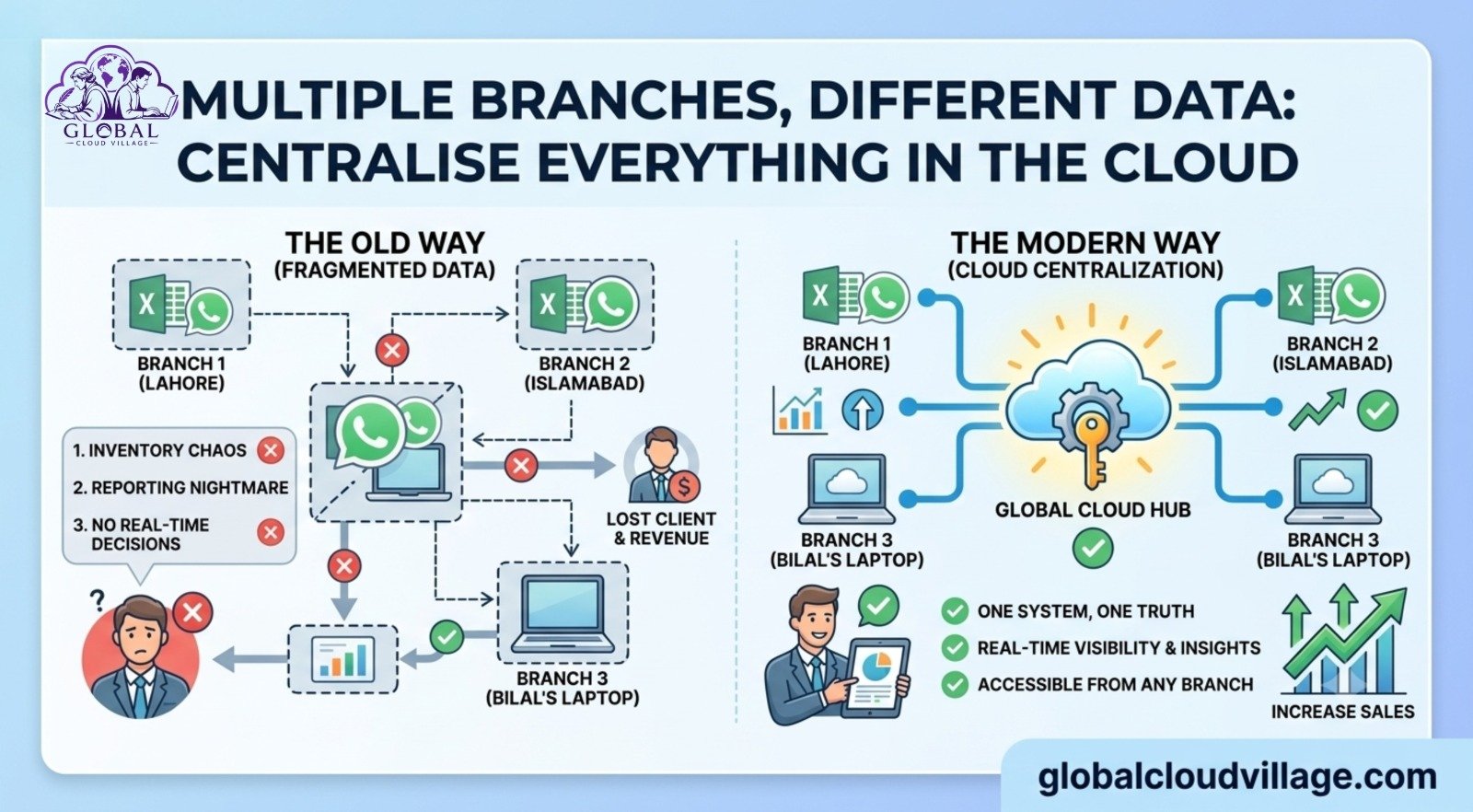
Branch 1 in Lahore says: “We sold 40 units.”
Branch 2 in Islamabad says: “We sold 38 units.”
Head office asks: “What’s our total inventory?”
Answer: “Sir, let me check and get back to you.”
Two days later, the numbers finally arrive. By then, you have already oversold. Or you overstocked. Or you lost a high-value client to a faster competitor.
If you manage two or more branches and each one runs on its own standalone Excel sheet, disconnected WhatsApp groups, and files trapped on “Bilal’s laptop,” you don’t have one unified business. You have three entirely different businesses that happen to share the same logo and don’t talk to each other.
In 2026, that is exactly how small and medium enterprises lose money without ever realizing why.
The fix is straightforward: Centralize data in the cloud. One system. One source of truth. Absolute access from any branch, anywhere.
The 4 Problems of “Different Data in Different Branches”
I’ve audited this specific operational friction across retail chains, medical clinics, private schools, and distribution companies. The symptoms are always identical:
1. Inventory Chaos
Branch A has 50 high-margin units sitting dead on the shelves, gathering dust. Branch B is completely out of stock, turning away eager cash-in-hand customers. Nobody realizes the mismatch until someone picks up the phone to call around—usually weeks too late.
2. The Month-End Reporting Nightmare
When the month closes, someone has to manually merge three or four different Excel sheets. Six hours are wasted copying and pasting data. Worst of all, the final numbers still don’t balance due to human data-entry errors.
3. A Total Lack of Real-Time Decisions
The business owner sitting in Karachi wants to analyze the morning sales trends in Lahore. They have to wait for an end-of-day email snapshot. By the time that data reaches the leadership dashboard, it is already historical rather than actionable insight.
4. Staff Can’t Cover for Each Other
A senior sales representative from Branch 1 visits Branch 2 to help cover a peak shift. A VIP client walks in, but the rep cannot pull up their purchase history because the local server is locked down. Your operation instantly looks fragmented and unprofessional.
The Bottom Line: Running on scattered data means you are making critical strategic decisions completely in the dark.
What Does It Actually Mean to Centralize Data in the Cloud?
It means deploying a single, unified database running on a shared software architecture.
Branch 1, Branch 2, the Head Office team, and your personal mobile dashboard all look at the same data points at the same second.
[Sale Logged in Lahore Branch]
│
▼ (Instant Cloud Sync)
[Global Inventory Auto-Updates Everywhere]
│
▼ (Real-Time Visibility)
[Head Office Views Updated Dashboard in 5 Seconds]
No tracking emails. No manual sheet merging. No more saying “let me check.”
The 5-Step Plan to Centralize All Branch Data
You can systematically move your organization to a unified data architecture within 30 days without shutting down active operations.
Step 1: Pick One Cloud System for All Branches
Do not allow individual branch managers to select their own preferred tools. That fractured approach is precisely how the operational mess started.
- For Retail & Multi-Location Inventory: Odoo, Zoho Inventory, Katana
- For Service Sectors & Clinics: Cliniko, SimplePractice, Custom CRM via Zoho Creator
- For Distribution Channels: Disty, Fieldproxy, SAP Business One Cloud
The Rule: If a software package does not feature native multi-branch data segregation and a robust mobile application, reject it immediately.
Step 2: Migrate Your Core Data Profiles
This requires intensive data entry, but it only needs to be executed once. Hire two data interns for one week to clean and upload four primary data blocks:
- A master product directory with standardized SKUs
- Verified, audited baseline stock levels per branch Location
- A centralized customer database
- Official, updated price lists
EEAT Tip: Clean your data thoroughly before importing it. Delete duplicate contacts. Standardize corporate names. “ABC Co” and “ABC Company” must be merged into one single corporate record.
Step 3: Establish Role-Based User Permissions
Security requires clear structural boundaries.
- A localized branch manager should only see data relating to their specific location.
- The head office accountant must have cross-branch financial access.
- The executive team retains full administrative rights to view global performance dashboards.
This access model ensures branch staff cannot accidentally or intentionally alter data belonging to another site. Operational control remains firmly in your hands.
Step 4: Train Branch Teams on One Unified Process
Centralization lives or dies on data entry compliance. Every branch must execute the identical three-step workflow: Sale Occurs → Transaction Logged in Cloud System → Global Inventory Automatically Adjusts.
Run a mandatory 1-hour Zoom training session. Record it for future onboarding, and distribute a simple 1-page Standard Operating Procedure (SOP) sheet at every point-of-sale terminal.
Step 5: Roll Out the System Gradually
Do not attempt a high-risk “Go-Live” across five branches simultaneously on a Monday morning.
Launch the cloud platform at your flagship branch first. Run it for seven days to identify user friction and optimize settings. Once stabilized, roll the system out to Branch 2. Within four weeks, your entire multi-location footprint will be running smoothly on a single system.
The Strategic Value of Centralized Operations in 2026
Relying on legacy desktop systems is a major competitive disadvantage.
Data published by the Harvard Business Review shows that enterprises that successfully centralize data in the cloud execute operational decisions three times faster and realize an average 23% reduction in total operational overhead.
Furthermore, market analysis from Gartner notes that by the end of 2026, 70% of growing SMEs operating out of two or more physical locations will have completely transitioned from desktop-bound architecture to cloud ERP environments.
Modern B2B and B2C clients expect an omni-channel experience. If a client interfaces with Branch 2, they expect your team to instantly know what they purchased from Branch 1 last month. Without real-time cloud centralization, achieving that level of customer retention is impossible.
Real-World Case Study: From 4 Excels to 1 Live Dashboard
Consider a growing retail fashion chain operating three busy storefronts across Punjab. Each store maintained its own separate local POS system and standalone Excel inventory trackers.
Inter-branch stock transfers required three days of phone calls and manual logging. The business owner had no accurate way to determine which location was generating the highest net profit margins.
We migrated their entire footprint to Zoho Inventory Cloud within 25 days:
- Consolidated three messy databases into one master inventory matrix.
- Deployed real-time stock transfer workflows accessible via smartphones.
The results after 60 days were clear:
- Inter-branch stock reconciliation dropped from 3 days to 3 hours.
- Month-end reporting cycles shrank from 2 full days down to 10 minutes.
- The owner was able to monitor real-time gross profit margins from his phone while traveling internationally.
- The brand reduced dead-stock overbuying by 18% because procurement decisions were backed by live data.
Connectivity & Security: Handling Local Disruptions
A frequent operational concern is: “What happens to our centralized data if our local internet connection drops?”
Modern enterprise cloud design resolves this in three ways:
- Native Offline Syncing: High-quality cloud POS and ERP apps are engineered to function seamlessly offline. Sales can still be processed locally; the data caches on the device and automatically syncs to the cloud database the moment connectivity resumes.
- Redundant 4G Routing: Deploying a budget-friendly 4G/5G industrial router equipped with a backup mobile data SIM at each branch ensures automatic failover if your primary broadband goes down.
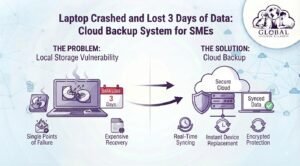
- Automated Daily Backups: Tier-1 cloud providers back up your operational data across multiple redundant server zones daily. This provides exponentially better security than saving data onto local office hard drives vulnerable to hardware failures, fire, or theft.
Cost vs. Operational Return on Investment
Centralizing your enterprise operations is highly cost-effective for growing small businesses:
| Cloud Platform Tier | Approximate Software Cost | Implementation Timeline |
| Zoho Inventory (SME Pack) | ~15,000 PKR / month (3 Branches) | 2 to 3 Weeks |
| Odoo Cloud Enterprise | ~25,000 PKR / month | 3 to 4 Weeks |
| Data Migration & Setup | 80,000 to 150,000 PKR (One-time cost) | Weeks 1 & 2 |
The Financial Math: If centralizing your data prevents just one major duplicate inventory purchase error worth 200,000 PKR, or stops three high-value clients from walking away due to stock communication errors, the cloud infrastructure has completely paid for itself within the first quarter.
The 3 Frequent Mistakes to Avoid
- Over-Customizing on Day One: Avoid spending months modifying standard cloud architectures before launch. Adopt 80% of the platform’s native workflows out-of-the-box, get your data live, and adjust your secondary customizations later.
- Allowing Process Inconsistency: If Branch 1 inputs every transaction perfectly but Branch 2 continues writing orders down on paper pads, your global data drops in value. Enforce operational compliance equally.
- Neglecting the Executive Dashboard: The core benefit of centralization is your executive visibility. Ensure your software provider configures a clean, mobile-responsive dashboard on your phone so you can manage by metrics rather than assumptions.
Conclusion: One Business, One Data Stream, Infinite Scale
Operating multiple branches should serve as a source of market strength, not operational confusion.
When you choose to centralize data in the cloud, you instantly gain clear visibility into what products are moving at specific locations, reconcile inventory movements in hours instead of days, base capital expenditures on real-time numbers, and empower your staff to serve clients seamlessly from any storefront.
Stop managing separate, disconnected operations under one name. Transition your organization into a single, cohesive business running across multiple locations. Centralize your data streams this month, look at your operations clearly, and build a system optimized for long-term growth.
Frequently Asked Questions About Cloud Data Centralization
Can a centralized cloud system manage different pricing matrices for different branches?
Yes. Enterprise cloud inventory platforms allow you to configure localized “Price Lists” or “Price Books” assigned to specific branch locations or customer profiles. This ensures that while your core inventory remains centralized, Branch A can automatically charge a premium based on local market dynamics while Branch B maintains standard pricing.
How do we handle cash management and daily register closures across different locations?
Modern cloud systems feature native multi-register and multi-session controls. Each terminal or branch manager opens and closes their own specific cash drawer session daily. The data logs independently under that branch’s profile, allowing head-office finance teams to audit individual store variances without mixing up cash flows.
What happens to our historical sales data currently sitting in old Excel sheets?
Your historical records can be archived and stored securely in a cloud data repository for long-term auditing compliance. When migrating to your new centralized live system, it is standard best practice to import only your current active data (live customers, current stock counts, open invoices) to keep the launch clean and rapid.
Is it possible to track inter-branch stock transfers while items are in transit?
Absolutely. Cloud inventory systems utilize a structured “In-Transit” warehouse status. When Branch 1 ships inventory to Branch 2, the items are automatically deducted from Branch 1’s available stock but do not show up in Branch 2’s inventory until the receiving manager clicks “Receive and Verify.” This eliminates phantom inventory listings.
Ready to Scale Your Enterprise Footprint?
Unifying your multi-branch data is an essential foundation for scaling your business toward total strategic freedom. The complete automation methodology includes database migration scripts, user-permission blueprints, and automated procurement templates.
Get your copy of Global Cloud Village and 4 Day Work Week on Amazon:
About the Author: Global Cloud Village
Global Cloud Village specializes in providing actionable operational frameworks centered on business systems, leadership, and digital transformation. We help ambitious founders and growing small businesses eliminate manual bottlenecks and transition into highly efficient, scalable cloud-first enterprises. Discover our latest operational insights at globalcloudvillage.com.