Getting Hacked Emails Daily? The SME Cloud Security Solution
The morning routine begins with an alarming notification: another company email account has been compromised, sending suspicious messages and malicious links to hundreds of clients.
For many small and medium-sized enterprise (SME) leaders, managing business email can feel like fighting an endless battle against phishing attempts, credential theft, spam, and unauthorized account access.
Email remains one of the most important communication channels for modern businesses. It carries customer conversations, invoices, contracts, passwords, financial information, internal discussions, and sensitive business documents.
That makes it an attractive target for cybercriminals.
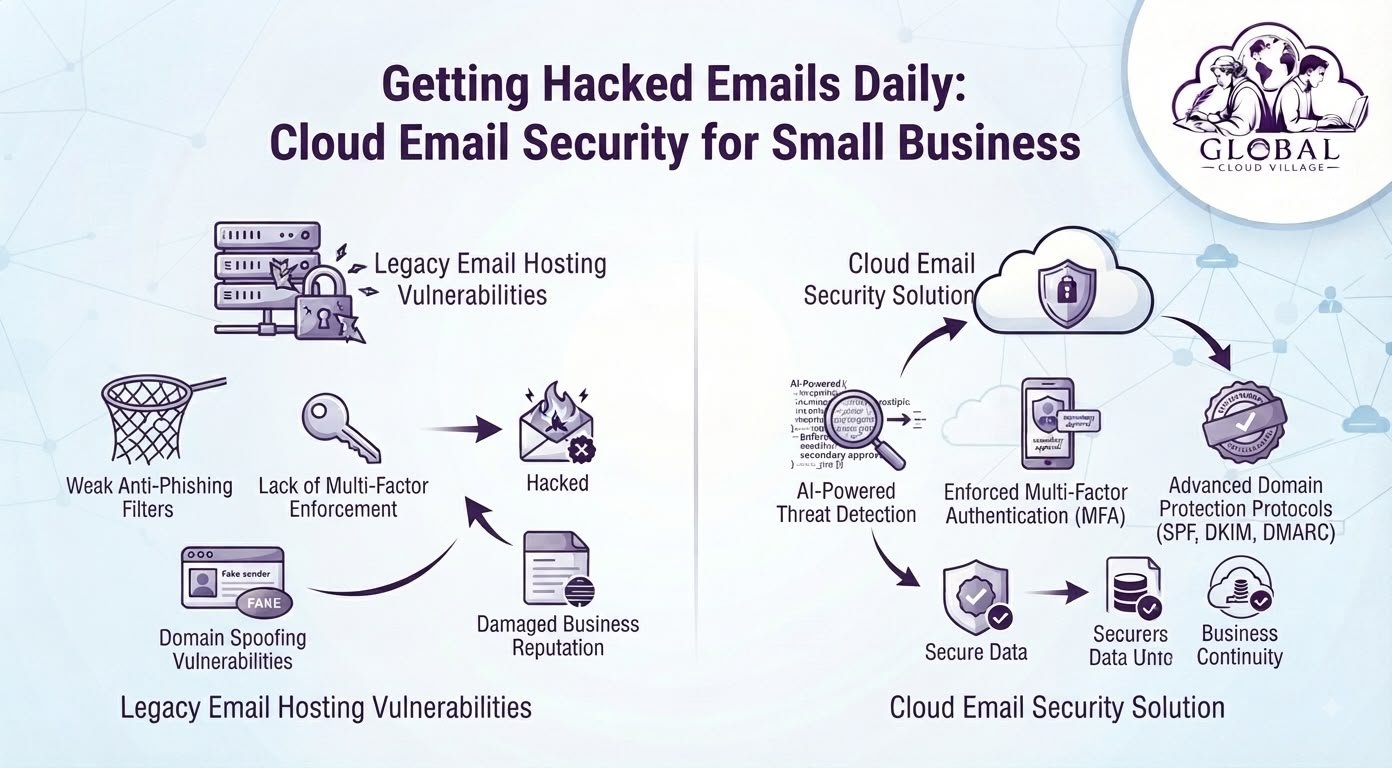
Legacy email servers and basic hosting packages may lack the security controls required to protect businesses against modern phishing, credential attacks, account compromise, and domain spoofing.
When an employee’s mailbox is compromised, the consequences can extend far beyond one inbox.
Attackers may impersonate employees, send fraudulent invoices, steal sensitive information, or use the compromised account to target customers and suppliers.
This is why SME Cloud Email Security should be treated as part of your core business infrastructure rather than an optional IT upgrade.
Moving business email to a properly configured cloud platform, combined with strong authentication and domain security controls, can create multiple layers of protection around one of your company’s most important digital communication channels.
Why SME Cloud Email Security Matters
Business email is often the gateway to other systems.
An attacker who gains access to an employee’s mailbox may be able to discover customer information, reset passwords, access shared documents, impersonate executives, or continue attacking other employees.
The problem becomes even more serious when businesses depend on a single password for account access.
A strong SME Cloud Email Security strategy combines several layers of protection, including secure cloud infrastructure, multi-factor authentication, phishing protection, domain authentication, access controls, monitoring, and employee awareness.
The goal is not to assume that cloud email makes hacking impossible.
The goal is to make unauthorized access significantly harder and limit the damage if an account is targeted.
The Dangerous Vulnerability of Legacy Email Hosting
Relying on basic email hosting or poorly configured mail infrastructure can create several cybersecurity weaknesses.
Weak Phishing Protection
Phishing attacks are designed to make employees perform an action that benefits the attacker.
That action could include:
- Clicking a malicious link
- Opening a harmful attachment
- Entering credentials into a fake login page
- Approving an unexpected authentication request
- Sending sensitive information
- Transferring money to a fraudulent account
A basic spam filter may not be sufficient against sophisticated social engineering attacks.
Weak Authentication
A password alone provides only one layer of protection.
If an employee reuses a password, falls for a phishing attack, or has credentials exposed in a data breach, attackers may attempt to use those credentials to access the business mailbox.
Multi-factor authentication adds another verification layer.
The National Institute of Standards and Technology recommends using phishing-resistant authentication where practical and provides detailed guidance on stronger authentication methods.
NIST Digital Identity Guidelines
Domain Spoofing
Your employees may not be the only people receiving fraudulent emails that appear to come from your company.
Attackers can attempt to impersonate your domain when sending fraudulent messages.
Email authentication technologies such as SPF, DKIM, and DMARC can help organizations establish stronger controls around domain-based email authentication.
The U.S. Cybersecurity and Infrastructure Security Agency also recommends implementing email authentication technologies to reduce spoofing and phishing risks.
The Email Attack Chain
A typical business email compromise scenario can look like this:
Phishing Email → Stolen Credentials → Account Compromise → Attacker Impersonation → Fraudulent Messages → Financial or Reputation Damage
Another route may look like:
Domain Spoofing → Fake Invoice → Customer Trust Exploitation → Financial Loss
The objective of SME Cloud Email Security is to introduce multiple controls that interrupt these attack paths.
The Cloud Email Security Solution
Moving business communications to a modern cloud email platform can provide access to stronger security capabilities.
Common enterprise platforms include Microsoft 365 and Google Workspace.
However, simply moving email to the cloud is not enough.
The platform needs to be properly configured.
A secure implementation should consider authentication, permissions, domain records, monitoring, recovery, device security, and employee training.
Advanced Threat Filtering
Modern cloud email platforms can use automated detection systems to identify suspicious messages, malicious attachments, phishing attempts, and unusual sender behavior.
Messages identified as suspicious can be filtered, quarantined, or flagged before they reach an employee’s inbox.
No filtering system catches every threat, which is why technical controls should be combined with employee awareness and authentication policies.
Multi-Factor Authentication
Multi-factor authentication requires users to provide an additional verification method beyond their password.
This means a stolen password alone may not be sufficient for an attacker to access the account.
For SMEs, MFA should generally be enabled for business email accounts, particularly for administrators and users with access to sensitive information.
SPF, DKIM and DMARC
Domain authentication is another important component of business email protection.
SPF helps specify which mail servers are authorized to send email for a domain.
DKIM adds a cryptographic signature that allows receiving systems to verify that an email was authorized and has not been altered in transit.
DMARC builds on SPF and DKIM and provides domain owners with a policy framework for handling messages that fail authentication checks.
Together, these technologies can strengthen protection against domain impersonation.
Access Controls
Not every employee needs access to every mailbox, folder, application, or administrative function.
A properly designed cloud environment should apply permissions based on job responsibilities.
Administrative accounts deserve particular attention because compromising one privileged account can create significantly greater damage than compromising a standard user account.
Step-by-Step Blueprint for SME Cloud Email Security
1. Audit Your Current Email Environment
Start by documenting your existing infrastructure.
Identify:
- Email provider
- Number of active accounts
- Administrator accounts
- Shared mailboxes
- External forwarding rules
- Existing MFA settings
- SPF configuration
- DKIM configuration
- DMARC configuration
- Suspicious login activity
- Legacy accounts
- Former employee accounts
You cannot secure what you cannot see.
2. Migrate to a Supported Cloud Email Platform
If your company relies on outdated hosting or poorly maintained mail infrastructure, evaluate whether a modern cloud email platform is appropriate.
The migration should be planned carefully to protect:
- Historical emails
- Contacts
- Calendars
- Shared mailboxes
- User accounts
- Domain configuration
- Existing business workflows
Avoid treating email migration as simply changing the MX record.
It should be treated as an infrastructure and security project.
3. Enable Multi-Factor Authentication
Require MFA across business accounts.
Prioritize:
- Administrators
- Finance employees
- Executives
- Sales teams
- Employees handling customer information
- Employees with access to sensitive documents
Where supported, consider stronger phishing-resistant authentication methods.
4. Configure Domain Authentication
Review your company’s:
SPF
DKIM
DMARC
records.
Do not simply copy generic DNS records from another organization.
Your records should reflect your actual email-sending infrastructure.
5. Review Account Permissions
Remove unnecessary administrative privileges.
Disable accounts belonging to former employees.
Review shared mailboxes.
Check external forwarding rules.
Review third-party applications that have access to company email.
These basic controls can significantly reduce unnecessary exposure.
6. Train Employees to Recognize Phishing
Technology cannot eliminate the human element.
Employees should know how to identify:
- Suspicious login requests
- Unexpected invoice changes
- Urgent payment requests
- Fake password-reset messages
- Unexpected attachments
- Suspicious links
- Executive impersonation
- Requests for confidential information
Employees should also know how to report suspicious messages quickly.
7. Establish an Email Incident Response Procedure
Your organization should already know what to do when an account is compromised.
The procedure should cover:
Disable or secure the affected account → Revoke active sessions → Reset credentials → Review authentication activity → Investigate mailbox rules → Check sent messages → Notify affected parties where necessary → Restore secure access
Having a predefined process is much better than trying to invent one during an active incident.
The Email Security Comparison Matrix
| Security Factor | Basic Email Hosting | Enterprise Cloud Email Security | Business Benefit |
| Threat Filtering | Basic spam protection may miss sophisticated threats | Advanced filtering and threat detection capabilities | Better phishing protection |
| Authentication | Often password-dependent | MFA and stronger authentication options | Reduced account compromise risk |
| Domain Protection | May be poorly configured | SPF, DKIM and DMARC can be configured | Reduced spoofing risk |
| Administration | Limited visibility | Centralized security controls | Easier security management |
| Access Control | Basic account permissions | Granular administrative and user controls | Reduced unnecessary access |
| Collaboration | Limited integration | Integrated productivity ecosystem | Better secure collaboration |
| Monitoring | Limited visibility | Security and sign-in monitoring options | Faster investigation |
| Scalability | Requires manual infrastructure management | Designed for scalable cloud environments | Easier business growth |
Why MFA Should Be a Business Requirement
Many organizations treat MFA as an inconvenience.
That mindset needs to change.
The small amount of friction created by an additional authentication step is insignificant compared with the potential consequences of a compromised business email account.
A stolen password can potentially expose:
- Customer conversations
- Payment information
- Internal documents
- Supplier information
- Contracts
- Password-reset emails
- Financial discussions
- Business plans
For this reason, MFA should be considered a fundamental security control rather than an optional feature.
Protect Your Domain Reputation
Imagine your sales manager’s mailbox gets compromised.
The attacker sends hundreds of phishing emails to your customers.
Those customers may not know that the account was compromised.
They simply see your company name.
This can damage trust.
Customers may become suspicious of legitimate invoices.
Partners may begin treating your emails as potential threats.
Your domain reputation can suffer.
That is why email security is not just an IT issue.
It is also a brand protection issue.
SPF, DKIM, and DMARC can help organizations authenticate legitimate email and reduce the ability of attackers to impersonate their domains.
Don’t Forget Email Recovery
Security is not only about preventing unauthorized access.
You also need to consider what happens after an incident.
Organizations should evaluate whether their email environment has appropriate:
- Data retention
- Recovery capabilities
- Backup strategy
- Account recovery procedures
- Incident response processes
- Legal and compliance requirements
Cloud email should not automatically be treated as a complete backup strategy.
Your recovery requirements should be assessed separately.
The Hidden Cost of Email Compromise
The financial impact of a compromised business email account is not limited to the cost of recovering the account.
Consider the potential cost of:
- Fraudulent payments
- Lost customer trust
- Incident investigation
- IT recovery
- Legal advice
- Employee downtime
- Customer notification
- Reputation damage
- Lost business opportunities
For an SME, even one serious email security incident can have a disproportionate impact.
This makes preventive security investment easier to justify.
Create an SME Email Security Checklist
Before considering your email environment secure, review the following:
MFA enabled for all important accounts
Administrator accounts protected with stronger authentication
SPF configured correctly
DKIM configured correctly
DMARC configured and monitored
Former employee accounts disabled
External forwarding rules reviewed
Shared mailboxes reviewed
Suspicious login activity monitored
Employees trained on phishing
Incident response procedure documented
Email recovery strategy reviewed
Sensitive accounts regularly audited
This checklist is simple, but it gives management a practical starting point.
Conclusion: Modernize Your Communications, Reduce Email Risk
Getting suspicious or compromised emails every day should not be accepted as normal business activity.
Email is too important to leave protected only by a password and a basic spam filter.
A properly implemented SME Cloud Email Security strategy combines cloud infrastructure with strong authentication, domain protection, access controls, threat filtering, employee training, and recovery planning.
The objective is not to promise that your business can become completely immune to cyberattacks.
No responsible security strategy can make that promise.
The objective is to make attacks harder, detect suspicious activity earlier, limit account exposure, and give your organization a structured response when something goes wrong.
Your business email carries your reputation, customer relationships, financial information, and operational communications.
Treat it like the critical business infrastructure it is.
Frequently Asked Questions About SME Cloud Email Security
Why Are Small Businesses Targeted So Frequently by Email Hackers?
SMEs can be attractive targets because they often have valuable customer and financial information but fewer dedicated cybersecurity resources.
Attackers may also target SMEs as stepping stones into larger organizations, suppliers, or customers.
The best defense is a layered security approach rather than relying on a single security product.
How Difficult Is It to Migrate Existing Email to a Cloud Platform?
The difficulty depends on your current email provider, mailbox size, number of users, domain configuration, applications, and migration requirements.
A professional migration plan should account for historical emails, contacts, calendars, shared mailboxes, DNS records, authentication, and user access.
Do not assume every migration can be completed overnight without disruption.
Does Multi-Factor Authentication Slow Down Daily Employee Communication?
MFA adds an additional authentication step, but modern authentication systems can make the process relatively simple for employees.
The small amount of additional friction should be weighed against the risk of relying entirely on passwords.
What Are SPF, DKIM and DMARC?
SPF identifies authorized sending infrastructure.
DKIM uses cryptographic signatures to authenticate messages.
DMARC provides a policy framework that uses SPF and DKIM results to help domain owners manage messages that fail authentication.
Together, they can strengthen domain-level email security.
Is Cloud Email Automatically Secure?
No.
Cloud platforms can provide sophisticated security controls, but organizations still need to configure and manage them properly.
MFA, permissions, domain authentication, monitoring, employee training, recovery planning, and security policies remain important.
What Should We Do If a Business Email Account Is Compromised?
Immediately secure the affected account, revoke active sessions where possible, reset credentials, review suspicious authentication activity and mailbox rules, investigate messages sent from the account, and follow your organization’s incident response process.
If financial fraud or sensitive information may be involved, involve the appropriate IT, security, legal, financial, and law-enforcement professionals.
Scale Your Enterprise Infrastructure With Greater Clarity
Eliminating security vulnerabilities and modernizing your technology stack is the key to sustainable growth.
The objective is not simply to buy another security product.
It is to build an infrastructure where your people, data, applications, and communications are protected by sensible processes and technology.
Get your copy of Global Cloud Village and 4 Day Work Week on Amazon:
For more publications and resources, explore the Amazon Author Profile.
About the Author: Global Cloud Village
Global Cloud Village translates complex digital technology systems into clear, human-centric strategies for growing SMEs, founders, and industry leaders.
We help businesses replace clunky, fragmented legacy processes with practical cloud architectures, automation, digital transformation, and operational strategies that support sustainable growth.
Explore more business optimization insights at globalcloudvillage.com.