Paying Ransom to Get Data Back? The Cheaper Cloud Alternative
The ransom note on the locked office computer screen is stark and intimidating:
Pay several thousand dollars in cryptocurrency within 48 hours, or your company’s data will remain inaccessible and may be leaked.
For a cash-strapped small-to-medium enterprise (SME) leader facing sudden data paralysis, paying the ransom can feel like the fastest way to save the business.
It is also a dangerous gamble.
Paying a ransom does not guarantee that criminals will restore access to your files. The UK National Cyber Security Centre (NCSC) specifically warns that organizations may not regain access to their data after payment, while the FBI has also warned that paying does not guarantee a working decryption key.
The better strategy is to prepare before the attack happens.
A properly designed ransomware prevention cloud backup strategy gives your business an independent recovery path when attackers attempt to encrypt or destroy operational data.
The goal is not simply to store another copy of your files.
The goal is to maintain a protected, tested, recoverable copy that ransomware cannot easily destroy along with your production systems.
The Dangerous Fallacy of Paying a Ransom
Relying on ransom payments as an emergency recovery strategy exposes your business to several financial and operational risks.
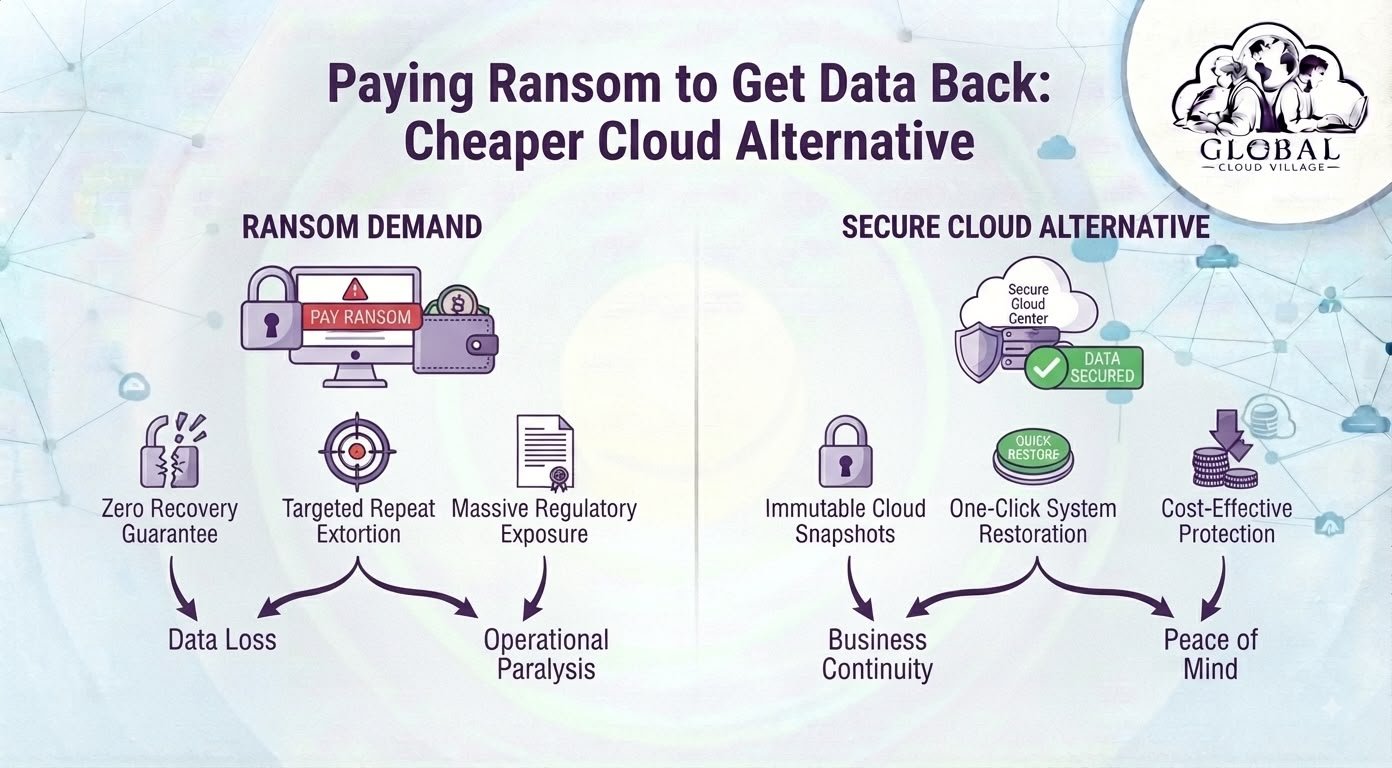
Zero Recovery Guarantee
Cybercriminals operate outside legitimate contractual or regulatory frameworks.
If you transfer cryptocurrency, there is no guarantee that the attacker will provide a working decryption key.
The NCSC explicitly states that paying a ransom does not guarantee access to your data or computer.
Repeat Targeting
Paying an attacker does not remove the underlying security weakness.
Your systems may remain compromised, credentials may still be exposed, and vulnerabilities may remain unpatched.
The NCSC also warns that organizations that pay may be more likely to be targeted again.
Legal and Regulatory Risk
Ransomware payments can also create legal and compliance concerns, particularly when sanctioned entities or jurisdictions are involved.
For that reason, ransomware response should involve qualified cybersecurity, legal, and regulatory professionals rather than treating payment as a simple IT purchasing decision.
Paying Does Not Solve Data Theft
Modern ransomware incidents can involve both encryption and data theft.
Even if a company has a backup and refuses to pay, attackers may still threaten to publish stolen information.
This means ransomware prevention cloud backup should be only one part of a broader cybersecurity strategy that includes access control, endpoint protection, monitoring, patching, identity security, and incident response.
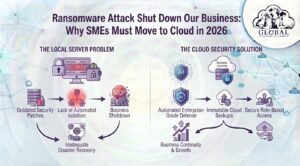
Ransomware Attack vs. Protected Cloud Recovery
Ransomware attack:
Ransomware Attack → Data Encryption → Panic → Ransom Demand → Uncertain Recovery → Financial Loss
Protected recovery:
Ransomware Attack → Incident Isolation → Clean Backup Identified → Systems Restored → Business Resumes
The difference is preparation.
A business with no reliable backup may have to make decisions under extreme pressure.
A business with tested, isolated recovery options has more choices.
Ransomware Prevention Cloud Backup: The Secure Alternative
Cloud backup can provide a powerful layer of protection, but simply uploading files to a cloud folder does not automatically make an organization ransomware-resistant.
The backup architecture must be designed to protect recovery data from unauthorized modification or deletion.
The NCSC specifically recommends backup systems that can resist destructive ransomware, protect previous versions, and allow organizations to restore from earlier clean versions if later backups become corrupted.
Immutable or Protected Recovery Points
A ransomware-resistant backup system should prevent attackers from simply modifying or deleting every available recovery point.
Depending on the platform, this may involve immutable storage, retention locks, version history, soft-delete protection, isolated backup accounts, or other controls.
The objective is simple:
An attacker who compromises your production environment should not automatically gain the ability to destroy every backup.
Versioned Recovery
Imagine ransomware encrypting your production database at 2:00 PM.
If your backup system has maintained multiple protected recovery points, you may be able to restore the environment to a clean state from before the encryption occurred.
This is why version history matters.
The NCSC recommends backup services that allow restoration from an earlier version even when later versions have become corrupted.
Isolated Backup Infrastructure
A cloud backup connected to every employee account is not automatically secure.
Attackers may attempt to compromise backup credentials or move laterally into connected backup systems.
Strong access controls, network separation, privileged accounts, multi-factor authentication, and isolated recovery environments can reduce this risk.
The NCSC recommends protecting backup systems from the wider network and ensuring that backup copies are appropriately isolated.
Predictable Recovery Costs
A ransomware attack can create unpredictable costs:
- Ransom demands
- Downtime
- Forensic investigation
- Emergency IT support
- Legal consultation
- Customer notification
- Regulatory response
- Lost sales
- Data recovery
- Reputation damage
A properly planned cloud backup and disaster recovery environment converts at least part of that uncertainty into a predictable technology and maintenance expense.
The objective should not be to claim that cloud backup is always cheaper than every ransom.
The objective is to make ransom payment unnecessary as the primary recovery strategy.
Step-by-Step Ransomware Prevention Cloud Backup Blueprint
1. Audit Your Current Backup Vulnerabilities
Start by identifying exactly what happens if ransomware reaches your primary systems.
Ask:
- Where are our backups stored?
- Are they connected to the production network?
- Can normal administrator accounts delete them?
- Are previous versions retained?
- How long are recovery points kept?
- Who controls backup credentials?
- Are backups encrypted?
- Are backups regularly tested?
- How quickly can critical systems actually be restored?
Do not assume that having a backup means having a recoverable backup.
2. Implement Protected Cloud Backups
Deploy automated backup infrastructure designed to preserve multiple recovery points.
Where appropriate, use:
- Immutable storage
- Versioning
- Retention policies
- Isolated backup accounts
- Strong identity controls
- Multi-factor authentication
- Encryption
- Access logging
- Separate administrative credentials
The exact architecture should match the organization’s systems, risk profile, regulatory requirements, and recovery objectives.
3. Follow the 3-2-1 Backup Principle
A commonly used strategy is the 3-2-1 approach:
3 copies of important data
2 different storage types
1 copy stored offsite
The NCSC recommends multiple backup copies in different locations and warns against relying on multiple copies within a single cloud service or on a single removable device.
For higher-risk environments, organizations can consider additional controls such as immutable and offline recovery copies.
4. Establish a Ransomware Response Policy
Do not wait until an attack occurs to decide what your company will do.
Your incident response plan should define:
- Who declares a cyber incident
- Who disconnects affected systems
- Who contacts the IT/security provider
- Who handles legal and regulatory issues
- Who communicates with customers
- Who approves recovery procedures
- How backups are validated
- How systems are restored
The question should not be:
“Should we pay the ransom?”
The first question should be:
“Can we recover safely without relying on the attacker?”
5. Test Your Recovery Process
A backup that has never been restored is an assumption.
Regularly test whether your organization can actually recover critical systems.
Test:
- File restoration
- Database restoration
- Application recovery
- User access
- Backup integrity
- Recovery time
- Recovery point objectives
- Communication procedures
The NCSC specifically recommends regularly testing backups and ensuring that organizations know how to restore their data.
What to Do When a Ransomware Screen Appears
If ransomware appears on an employee’s computer, do not treat it as a normal technical support ticket.
The immediate priority is containment.
Step 1: Isolate the Device
Disconnect the affected device from the network to reduce the possibility of further spread.
Step 2: Contact Your IT or Security Team
Activate your incident response process.
Do not start randomly deleting files or reinstalling systems before the incident has been assessed.
Step 3: Protect the Backup Environment
Make sure backup credentials and management systems are protected from the compromised environment.
Attackers frequently target backups because destroying recovery options increases pressure on the victim to pay.
Step 4: Identify a Clean Recovery Point
Determine when the compromise occurred and identify a recovery point that is believed to predate the infection.
Step 5: Validate Before Restoration
Do not blindly restore infected or potentially compromised data.
The NCSC recommends ensuring backups and recovery devices are clean before restoration and scanning backups for malware.
Step 6: Restore and Monitor
Restore systems using a controlled recovery process.
After restoration, monitor the environment for signs that the attacker remains present.
Cloud Backup Does Not Mean Automatic Ransomware Protection
This distinction is critical.
A normal cloud synchronization folder is not the same thing as a ransomware-resistant backup system.
If ransomware encrypts files on a local computer and the encrypted versions automatically synchronize to the cloud, the cloud may simply preserve the encrypted files.
The NCSC has documented incidents where ransomware affected connected cloud storage and emphasizes that cloud backups are not resistant to ransomware by default.
That is why a proper ransomware prevention cloud backup strategy needs:
- Version history
- Protected recovery points
- Access controls
- Isolation
- Retention policies
- Encryption
- Monitoring
- Regular recovery testing
Cloud is the storage location.
Security architecture is what makes the backup resilient.
The Ransom vs. Cloud Recovery Cost Comparison
| Recovery Approach | Paying the Ransom | Protected Cloud Backup & Recovery |
| Initial Cost | Potentially large and unpredictable ransom demand | Predictable infrastructure and subscription costs |
| Recovery Guarantee | No guarantee that attackers will restore data | Recovery depends on the integrity and testing of available backups |
| Data Security | Attackers may still possess stolen data | Protected recovery copies provide an independent recovery path |
| Future Risk | Underlying vulnerability may remain | Security and backup controls can be improved continuously |
| Operational Control | Depends on criminals cooperating | Organization controls its recovery process |
| Business Continuity | Potentially uncertain | Planned recovery procedures can reduce downtime |
The financial advantage of backup is not simply that cloud storage is cheaper than a ransom.
Its greater value is control and preparedness.
How Much Should an SME Spend on Ransomware Prevention?
There is no universal price.
The right investment depends on:
- Number of employees
- Amount of data
- Critical applications
- Recovery requirements
- Compliance obligations
- Existing IT infrastructure
- Acceptable downtime
- Acceptable data loss
A small company may require a relatively simple backup architecture.
A larger organization with customer databases, ERP systems, financial records, and multiple locations may require more sophisticated disaster recovery.
The correct question is not:
“What is the cheapest backup?”
It is:
“What would it cost us if our most important systems were unavailable for one day, one week, or permanently?”
That number provides the foundation for a sensible recovery budget.
Conclusion: Modernize Your Backup, Reduce Ransomware Leverage
Facing a ransomware demand is terrifying.
But paying a cybercriminal should not be your organization’s primary recovery strategy.
There is no guarantee that payment will restore your systems, and it does not remove the underlying security problem.
A properly designed ransomware prevention cloud backup strategy gives your business another option.
Regular backups.
Protected recovery points.
Isolated infrastructure.
Strong access controls.
Tested restoration.
Clear incident response procedures.
Together, these controls can significantly improve your ability to recover without depending on the attacker.
The goal is not to promise that ransomware can never affect your company.
The goal is to ensure that when an attack happens, your business still has a way forward.
Frequently Asked Questions About Ransomware Prevention Cloud Backup
Can Ransomware Encrypt Files Stored in the Cloud?
It can affect cloud data if the cloud storage is connected to compromised systems or accounts and lacks appropriate protection.
Simply storing files in the cloud does not automatically make them ransomware-resistant.
Use protected versions, appropriate access controls, isolation, retention policies, and tested recovery procedures.
Is Cloud Backup Enough to Prevent Ransomware?
No.
Ransomware prevention cloud backup is one layer of a broader cybersecurity strategy.
Organizations should also use endpoint protection, patch management, identity security, multi-factor authentication, access controls, monitoring, employee awareness, and incident response planning.
What Should Our Team Do Immediately If a Ransomware Screen Appears?
Isolate the affected device from the network and contact your IT or cybersecurity team.
Avoid connecting additional storage devices and do not immediately restore backups until the incident has been investigated.
Recovery should be performed from a known-clean backup using a controlled process.
Should an SME Ever Pay a Ransom?
There is no universal legal or business answer that applies to every incident.
However, major cybersecurity and law-enforcement guidance does not encourage ransom payment, and payment does not guarantee recovery.
Organizations should involve qualified cybersecurity, legal, and relevant regulatory professionals when evaluating an actual incident.
How Often Should Cloud Backups Be Tested?
There is no single interval that fits every organization.
Critical systems should be tested regularly enough that the organization can demonstrate that backups are usable and that staff know how to restore them.
A backup strategy should define recovery objectives and test against them rather than simply assuming that successful backup jobs equal successful recovery.
Scale Your Enterprise Infrastructure With Greater Resilience
Modern businesses cannot afford to treat data protection as an afterthought.
Cloud infrastructure, automation, cybersecurity, disaster recovery, and operational efficiency should work together as part of a broader technology strategy.
Get your copy of Global Cloud Village and 4 Day Work Week on Amazon Kindle:
For more publications and resources, explore the Amazon Author Profile.
About the Author: Global Cloud Village
Global Cloud Village translates complex digital technology systems into clear, human-centric strategies for growing SMEs, founders, and industry leaders.
We help businesses replace fragmented legacy processes with practical cloud architectures, automation, digital transformation, and operational strategies that support sustainable growth.
Explore more business optimization insights at globalcloudvillage.com.