Manager Traveling But Approvals Stuck: Cloud Approval Workflow
It’s Tuesday. Your manager is in Dubai for a 3-day expo. Your sales team has two critical quotations worth 1.2M PKR waiting for his signature. The client needs them today.
Your ops team messages the group chat: “Sir, the file is on the manager’s desk. He has to sign it physically.”
Now you wait. Three business days are completely wasted. The client gets frustrated and goes straight to a competitor.
This is exactly how small and medium enterprises (SMEs) lose high-value deals in 2026. It is not because of your pricing. It is not because of your product quality. It is simply because a piece of paper is physically stuck on an empty desk.
If your day-to-day operations still rely on a physical ink signature to move forward, you do not have an agile business. You have an operational bottleneck.
Let’s build a Cloud Approval Workflow so your work never grinds to a halt, even when your leadership team is on an international flight.
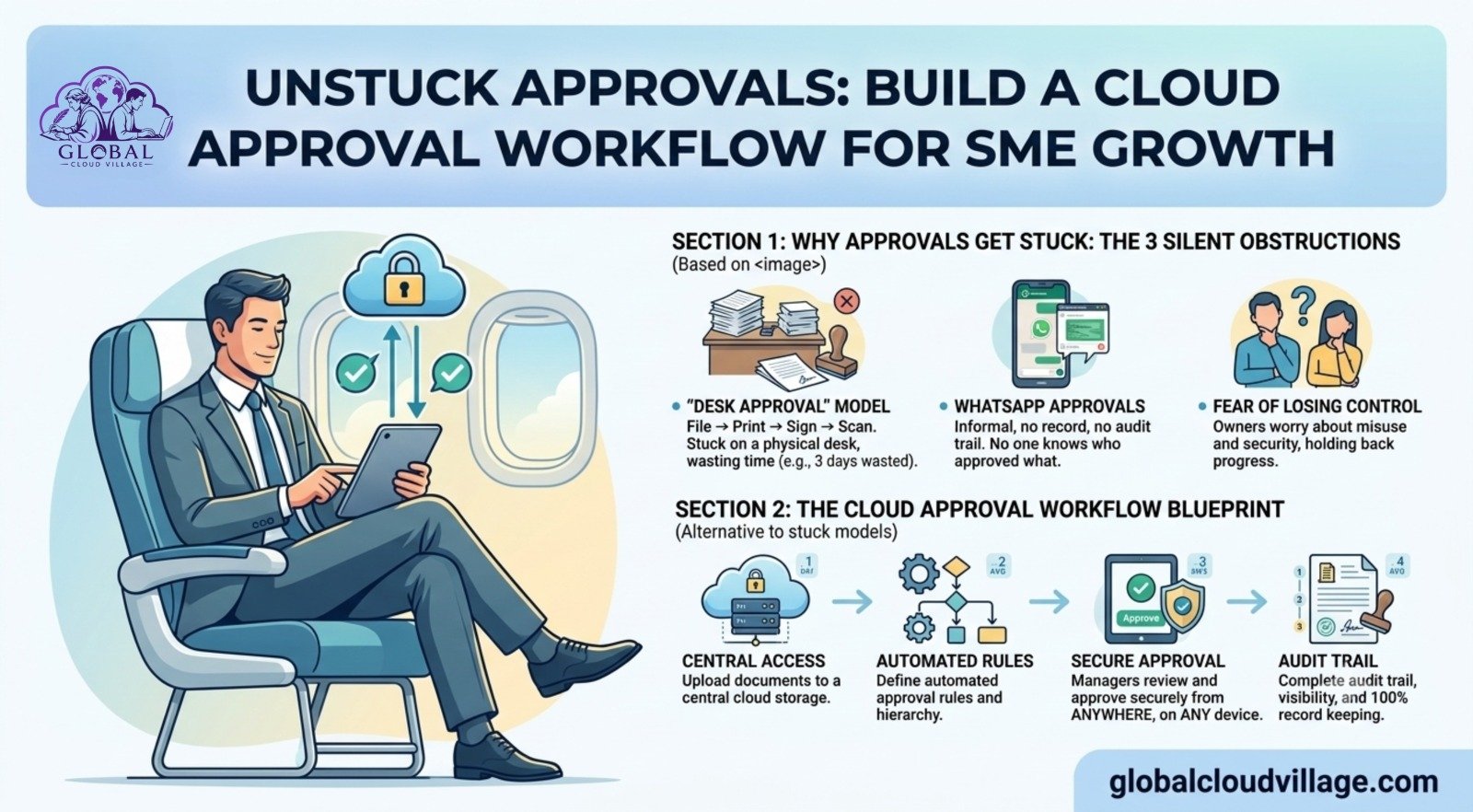
Why Approvals Get Stuck: The 3 Silent Obstructions
Over years of auditing business workflows, I’ve found that operational delays almost always stem from the same three structural flaws:
1. The “Desk Approval” Model
The legacy pipeline is predictable: File → Print → Manager Signs → Scan → Email. This rigid sequence only functions if the manager is sitting in the office, 9 to 5, holding a pen. The moment they step out for a client meeting or a business trip, the entire pipeline freezes.
2. The WhatsApp Approval Chaos
To bypass the desk bottleneck, teams often resort to panic-messaging: “Bro, please approve this” accompanied by a blurry smartphone screenshot.
This introduces a massive compliance risk. There is no central record and no formal audit trail. Two months later, when an auditing or financial discrepancy arises, everyone is left scrolling through endless chat histories wondering, “Who actually authorized this budget?”
3. The Fear of Losing Control
Many founders and business owners hold onto the belief: “If I am not physically signing every document, people will exploit the system.”
As a result, you force every minor request to pass through your personal desk. By trying to protect your business, you inadvertently become the single biggest delay factor in your own company.
The Reality: Slow decisions lead to frustrated clients and an unmotivated team.
What is a Cloud Approval Workflow?
Simply put, instead of moving physical paper from desk to desk, data moves securely online and automatically triggers notifications to the right decision-makers, allowing them to click “Approve” or “Reject” from any device.
[Sales Submits Quotation]
│
▼
[Auto-Notification to Manager’s Phone]
│
▼
[Manager Clicks “Approve” via App/Email]
│
▼
[Auto-Generated PDF Emailed Directly to Client]
The entire process takes under five minutes. It works seamlessly whether the manager is standing in a convention center in Dubai, waiting at an airport terminal, or working from home. This is how modern, fast-moving SMEs operate in 2026.
How to Build a Cloud Approval Workflow in 48 Hours
You do not need an expensive team of software developers to set this up. You can easily build this using accessible, low-code tools.
Step 1: Map Your 3 Most Delayed Approvals
Do not attempt to digitize your entire operational manual overnight. Pick the three primary workflows that cause the most painful delays:
- Quotations above 500,000 PKR
- Employee leave and vacation requests
- External purchase orders (POs)
For each workflow, map out the exact path: Who submits the data? → Who reviews and approves it? → What specific action happens immediately after authorization?
Step 2: Choose Your Technology Stack
Select a tool based on your current team size and monthly budget:
- Option A: The Free Route (Google Forms + Sheets + Apps Script)
- Best for early-stage startups. You build a Google Form for submissions, data populates a central Google Sheet, and an automated email alert goes to the manager. The manager can approve or reject directly via email loops.
- Option B: The Low-Cost Route (Zoho Creator / Kissflow / Approve.com)
- Dedicated drag-and-drop workflow platforms. These cost roughly 3,000 to 8,000 PKR per month. They provide native mobile apps, automated reminders, and instant digital audit logs. This is highly recommended for teams of 10 to 50 people.
- Option C: The Built-In Route (Your Existing CRM or ERP)
- Platforms like HubSpot, Zoho CRM, and Odoo have built-in approval engines. If you are already paying for these platforms, you simply need to turn on and configure their native approval routing.
Step 3: Configure the Core Flow (Example: Sales Quotations)
Here is how a typical automated quotation flow works once configured:
- Submission: A sales rep fills out a structured digital form with the Client Name, Deal Amount, Item Breakdown, and Profit Margin.
- Routing: The system automatically forwards a structured summary to the manager via an email alert or a dedicated mobile app push notification.
- Action: The manager reviews the margins on their phone and clicks a green “Approve” button.
- Execution: An automation tool (like Zapier or an integrated script) compiles the data into a professional PDF quotation and emails it straight to the client.
- Logging: The central database updates instantly: Approved on 20-April-2026 by Ahmed (Manager).
Step 4: Set Clear Rules and Guardrails
Automated delegation requires clear operational parameters to maintain absolute control:
- Tiered Thresholds: Define boundaries. A department manager can approve expenses up to 1M PKR. Anything higher automatically routes up to the CEO.
- SLA Reminders: Set the system to send an automated nudge every 4 hours if an urgent request sits unaddressed.
- Mandatory Rejections: If an approver clicks “Reject,” the system must force them to type a specific reason before the workflow closes. This eliminates arbitrary rejections and ensures clear feedback loops.
Step 5: Test and Train Your Team
Run two or three mock approvals with your team to flush out any friction. Record a quick, two-minute video showing exactly how to submit a request and how to sign off on one. Pin that video to your team’s internal communication channels for easy reference.
Why Digital Workflows Are Mandatory in 2026
Relying on paper isn’t just an inconvenience; it’s a direct threat to your market share.
According to data from McKinsey, companies that transition to structured digital workflows make critical business decisions up to five times faster than traditional paper-bound companies.
Furthermore, research by Deloitte highlights that 68% of B2B buyers expect an official quote within 24 hours of a meeting. If your business takes three days to reply because a manager is catching a flight, you are effectively handing that client over to your faster competitors.
From a compliance standpoint, digital approvals featuring encrypted timestamps, unique user IDs, and logged IP addresses are far more secure and audit-proof than an easily forged signature scribbled on a piece of paper. Corporate banks, legal frameworks, and external auditors prefer digital logs because they cannot be retroactively altered.
Real-World Case Study: From 72 Hours to 15 Minutes
Consider a medium-sized manufacturing SME operating out of Faisalabad. Every single raw material purchase order required the physical signature of the managing director. Because the owner traveled internationally for trade shows at least two weeks out of every month, purchasing routinely stalled, which delayed production schedules.
We designed and deployed a cloud workflow using Zoho Creator over a weekend:
- Implemented a standardized digital purchase request form for factory supervisors.
- Set up conditional routing: requests automatically pass to the Head of Department, then to Finance, and finally to the Owner’s smartphone if the amount exceeds predefined limits.
- Enabled instant mobile push alerts with clear action buttons.
The operational impact within 30 days was undeniable:
- Average internal approval cycles crashed from 72 hours down to 15 minutes.
- Procurement and factory floors stopped stalling, keeping production exactly on schedule.
- The management team stopped receiving frantic midnight follow-up calls, allowing the owner to focus entirely on his business development travel.
The 3 Frequent Mistakes to Avoid
- Overcomplicating the Approval Chain: Forcing a document to pass through four or five different people creates unnecessary lag. Keep your approval chains to a maximum of two people whenever possible.
- Ignoring Mobile Optimization: If your managers cannot easily execute approvals on a clean mobile interface while walking through an airport, the system fails. Always test the mobile user experience first.
- Failing to Set Operational SLAs: Establish a clear company rule: All standard operational requests must be processed within four business hours. Without this expectation, files will simply sit untouched in a digital inbox instead of a physical tray.
Cost vs. Return on Investment (ROI)
Let’s break down the actual monthly math for a mid-sized team:
| Tool Choice | Approximate Monthly Cost | Expected Setup Time |
| Google Workspace (Advanced) | Included in your existing workspace | 1 Business Day |
| Zoho Creator | ~5,000 PKR / month | 2 Business Days |
| Kissflow | ~8,000 PKR / month | 2 Business Days |
The Financial Trade-off: If your business saves even one medium-sized client contract worth 500,000 PKR from walking away due to a communication delay, your automated workflow tool has completely paid for itself for the next several years.
Conclusion: Build a Business That Runs Beyond You
Your business operations should never grind to a halt just because you or your management team step out of the building.
Transitioning to a structured Cloud Approval Workflow ensures that your sales reps can close deals instantly, leadership can manage oversight without operational stress, and clients receive professional responses in minutes rather than days.
Stop serving as the administrative bottleneck in your own organization. Select one core approval process this week, build out its digital path, and automate it. The next time you step onto a flight, you can rest easy knowing your business is actively moving forward on the ground—because the systems you built are doing the heavy lifting for you.
Frequently Asked Questions About Cloud Approval Workflows
What happens if a manager is completely offline or in a data dead zone during an urgent deal?
Most modern workflow tools allow you to configure “Delegate Approvals” or “Escalation Paths.” If an urgent quotation sits unaddressed for a specified period (e.g., 3 hours), the system automatically routes the request to an alternate designated manager or director, ensuring the sales process never stalls out.
Can an automated approval system integrate with our existing accounting software?
Yes. Platforms like Zoho Creator, Kissflow, and standard cloud forms can connect directly to financial platforms like QuickBooks Online, Zoho Books, or Odoo via native integrations or tools like Zapier. Once an expense or PO is approved in the workflow app, it can automatically generate the matching entry in your ledger.
Is an electronic or cloud-based approval legally binding for B2B contracts?
Absolutely. Electronic signatures and digital workflow approvals backed by secure user authentication, verifiable email addresses, and unalterable digital timestamps are recognized under electronic transaction laws globally and locally. They hold full legal validity for standard corporate operational decisions and client transactions.
How do we prevent employees from entering false data into the approval form?
Digital forms use data validation rules to maintain accuracy. For instance, you can set fields to accept only specific numeric ranges for margins, make client selection a mandatory dropdown tied directly to your active CRM, and require supporting PDF documentation uploads before the form can be successfully submitted.
Ready to Automate Your Business Operations?
Transitioning away from manual approvals is the first step toward achieving total operational autonomy. The complete blueprint for scaling your enterprise includes automated workflow schemas, step-by-step API integration guides, and governance templates.
Get your copy of Global Cloud Village and 4 Day Work Week on Amazon:
About the Author: Global Cloud Village
Global Cloud Village provides practical, real-world frameworks on business systems, leadership, automation, and operational efficiency. We focus on helping growing small businesses and entrepreneurs transition away from manual friction and embrace high-efficiency digital models. Learn more and read our latest insights at globalcloudvillage.com.