Client Portal in Cloud: Why Your Clients Expect Real-Time Updates
Why a Client Portal in Cloud Is Becoming Essential for Every SME
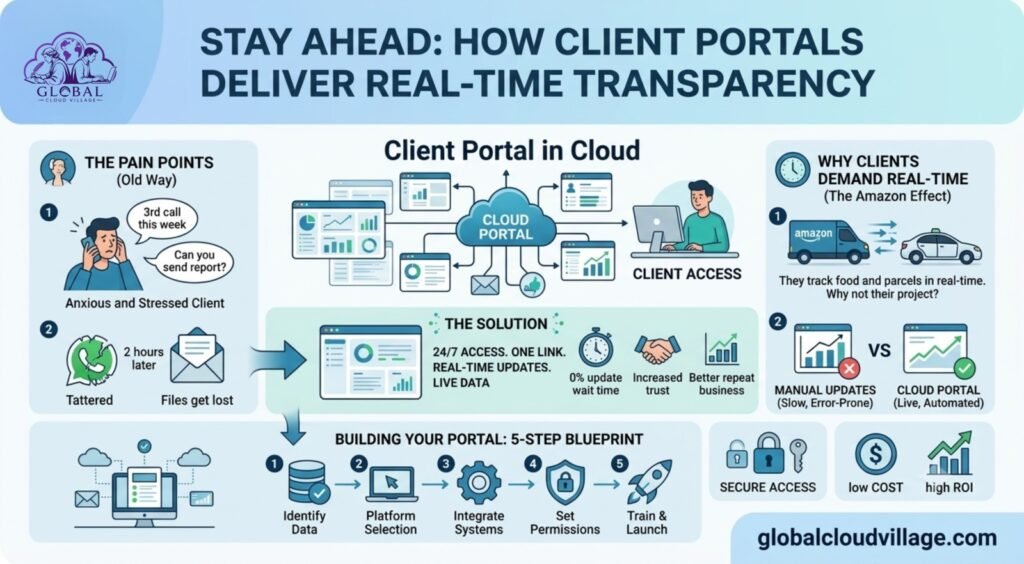
It’s Thursday afternoon.
Your client calls again.
“What’s the status of my project?”
“Can you send the latest report?”
“When will delivery be completed?”
Your project manager replies,
“I’ll check and get back to you.”
Two hours later, the updates finally arrive through WhatsApp.
The client feels uncertain.
Your team loses valuable time.
In today’s digital world, clients no longer expect delayed updates.
They expect the same visibility they receive when tracking an online order, food delivery, or courier shipment.
That’s exactly why every growing business should consider implementing a Client Portal in Cloud.
One secure login.
One dashboard.
Real-time visibility.
No more endless status update calls.
Why Clients Expect Real-Time Visibility
Customer expectations have changed dramatically.
The Amazon Effect
People track almost everything online.
Orders.
Deliveries.
Flights.
Food.
Ride-sharing.
Business services should offer the same level of transparency.
WhatsApp Isn’t a Project Management System
Messages disappear.
Files become difficult to find.
Multiple document versions create confusion.
Important conversations get buried.
Professional businesses need structured communication.
Status Updates Consume Valuable Time
Many project managers spend several hours every week responding to the same questions.
Instead of delivering work, they’re reporting on work.
A client portal automates this process.
What Is a Client Portal in Cloud?
A Client Portal in Cloud is a secure online workspace where customers can access project information whenever they need it.
Typical features include:
- Project progress
- Milestones and timelines
- Shared documents
- Invoices
- Payment history
- Feedback
- Communication history
Clients only see their own information.
Your internal systems remain protected.
The result is greater transparency without sacrificing security.
Ways to Build a Client Portal in Cloud
Modern cloud platforms make implementation surprisingly simple.
Option One: Complete Client Portal Platforms
Solutions such as SuiteDash, HoneyBook, Copilot, and Accelo provide:
- Project management
- File sharing
- Client messaging
- Electronic signatures
- Invoicing
- Payment tracking
These platforms work particularly well for agencies, consultants, and service businesses.
Option Two: Google Workspace
Businesses already using Google Workspace can create affordable portals using:
- Google Sites
- Google Drive
- Google Sheets
- Google Forms
This provides an excellent starting point for SMEs.
Option Three: Project Management Platforms
ClickUp, Asana, Monday.com, and similar platforms allow guest access.
Clients can securely monitor their own projects without viewing internal company information.
Five Steps to Launch a Client Portal in Cloud
Step 1: Focus on Client Priorities
Most clients only want four things.
- Current project status
- Latest files
- Billing information
- Communication
Keep the experience simple.
Step 2: Build a Clear Dashboard
Create dedicated sections for:
- Progress
- Deliverables
- Invoices
- Messages
The simpler the interface, the more clients will use it.
Step 3: Connect Existing Systems
Automate updates whenever possible.
Examples include:
- Completed tasks update project progress.
- New invoices appear automatically.
- Uploaded files become instantly available.
Automation eliminates duplicate work.
Step 4: Secure Access
Protect every portal using:
- Individual user accounts
- Role-based permissions
- Two-factor authentication
- SSL encryption
Each client should only access their own information.
Step 5: Introduce Clients to the Portal
Provide a short welcome video or quick-start guide.
Most clients learn the system within minutes.
Business Benefits of a Client Portal in Cloud
A client portal creates value for both businesses and customers.
Improved Transparency
Clients always know the current project status.
Fewer Support Requests
Project managers spend less time answering routine questions.
Better Customer Experience
Clients appreciate instant access to important information.
Stronger Professional Image
Modern digital experiences increase confidence and trust.
Increased Client Retention
Satisfied clients are more likely to continue working with your business.
A Real SME Success Story
A digital agency serving fifteen active clients struggled with constant update requests.
Project managers spent nearly three hours every day preparing screenshots and status reports.
The agency implemented a cloud-based client portal connected to:
- ClickUp
- Google Drive
- QuickBooks
Within forty-five days:
- Status update calls fell by 90%.
- Customer satisfaction increased significantly.
- Two new clients signed after experiencing the portal during sales presentations.
The portal paid for itself during its first month.
Is a Client Portal Secure?
Yes.
Modern cloud platforms often provide stronger protection than email or messaging applications.
Security features include:
- Password protection
- Two-factor authentication
- SSL encryption
- Audit logs
- Client-specific permissions
Sensitive business information remains protected while clients enjoy convenient access.
Common Mistakes to Avoid
Making the Portal Too Complicated
Clients don’t need dozens of menu options.
Keep navigation simple.
Forgetting to Update Information
An outdated portal damages trust.
Automate updates whenever possible.
Ignoring Mobile Devices
Many clients access information using smartphones.
Always test the portal on mobile devices before launch.
Why Every SME Needs a Client Portal in Cloud
Businesses no longer compete only on quality.
They compete on experience.
Clients value transparency.
Fast communication.
Easy collaboration.
Professional service.
A Client Portal in Cloud delivers all four while reducing your team’s administrative workload.
Final Thoughts on Client Portal in Cloud
The future of client communication isn’t more emails.
It isn’t more WhatsApp messages.
It’s giving customers secure, real-time access to the information they need.
A Client Portal in Cloud improves trust, reduces unnecessary communication, saves valuable time, and presents your business as modern and professional.
If you’re ready to build cloud-powered client experiences, automate communication, and strengthen customer relationships, the complete framework is covered in Global Cloud Village.
Get the Book
Global Cloud Village includes practical client portal frameworks, cloud collaboration strategies, implementation checklists, automation workflows, and real SME case studies designed for modern businesses.
Available now on Amazon Kindle:
https://www.amazon.com/dp/B0H3SF414R
Frequently Asked Questions
What is a client portal?
A client portal is a secure online platform where customers can access project updates, documents, invoices, and communication in real time.
Can SMEs build a client portal without developers?
Yes. Platforms such as SuiteDash, Google Workspace, ClickUp, Asana, and Monday.com allow businesses to create client portals without custom development.
Is a client portal more secure than email?
Yes. Modern client portals include encryption, user authentication, permissions, and audit logs that offer stronger security than traditional email.
Which businesses benefit most?
Marketing agencies, software companies, consultants, accounting firms, legal practices, creative agencies, construction companies, and any service-based SME managing ongoing client projects.
Suggested Internal Links
- Books
- Global Cloud Village
- Cloud Computing
- Digital Transformation
- Business Automation
- Customer Experience
- Productivity
- Contact
External References
- Microsoft 365
- Google Workspace
- ClickUp
- Monday.com
- Asana
- SuiteDash
- HoneyBook
- QuickBooks
- Salesforce Customer Experience Research