Team Can’t Work From Home During Heatwave: Build a Cloud Village in 7 Days
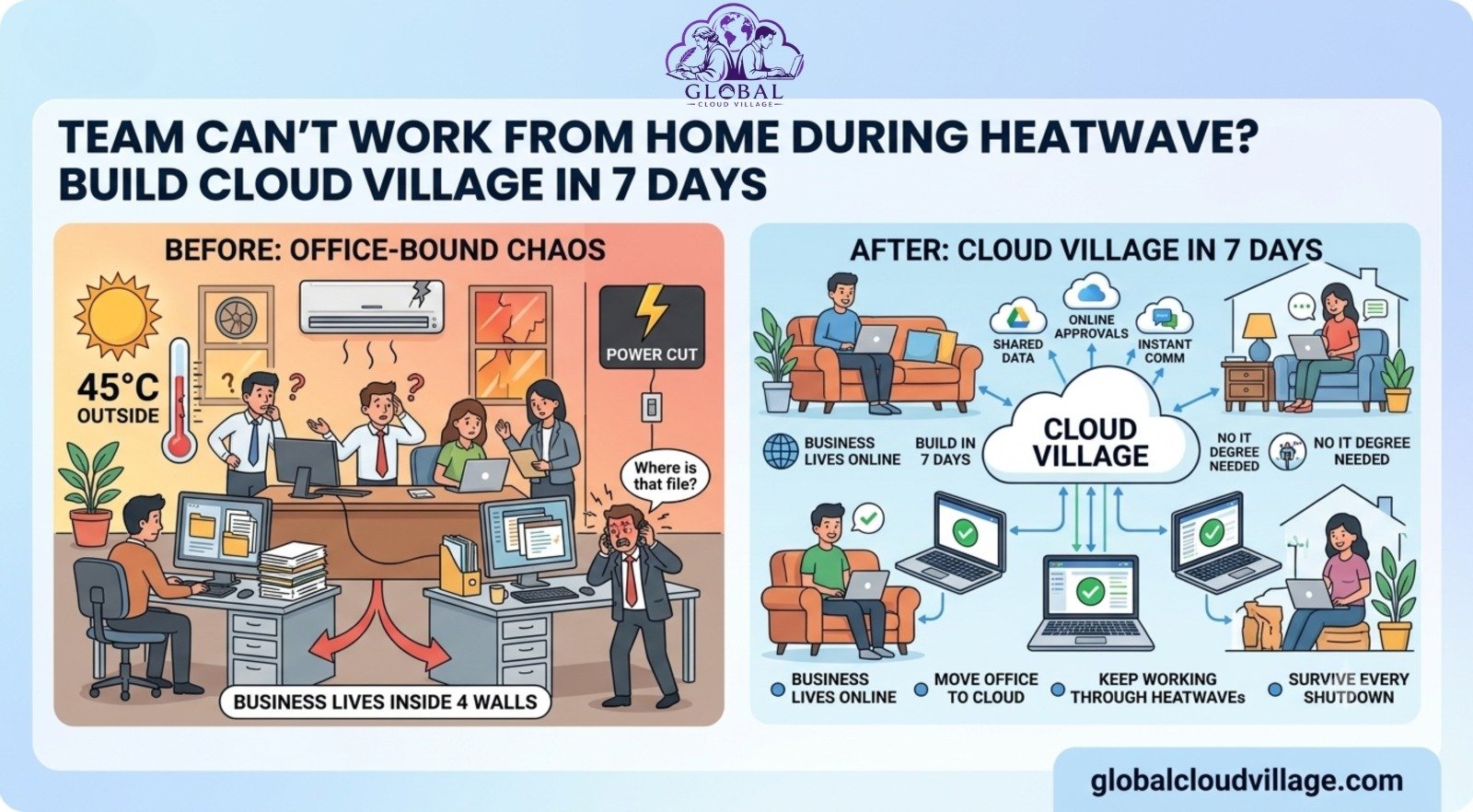
It’s 45°C outside. The government announced 2-hour load shedding.
Your office AC died.
And your team messages you: “Sir, can we work from home today?”
You say yes.
Then chaos starts.
Files are stuck on office PCs.
The accountant can’t access invoices.
Sales can’t send quotations.
The manager is calling every 10 minutes: “Where is that file?”
By 3 PM, work has stopped. And it’s not because of the heatwave.
It’s because your business lives inside four walls.
In 2026, this can’t happen anymore. Climate, traffic, power issues, remote clients… your team needs to work from anywhere. The good news: you can build what I call a “Cloud Village” in 7 days. No IT degree needed.
What is a Global Cloud Village for SMEs?
A Cloud Village is simple. All your important business data, tools, and approvals live online, not on one office computer.
Think of it like moving your entire office to Google Drive + WhatsApp + Cloud Apps. When the heatwave hits, your team just opens a laptop at home and keeps working.
This is how companies survived COVID, and this is how they’ll survive every heatwave, flood, and shutdown in 2026.
The 3 Problems Behind “We Can’t Work From Home”
1. All Data Lives on One Office PC
The main files are on “Bilal’s computer”. Bilal is home with no power. Work stops.
2. No Secure Way to Access Office Software
Your billing software, ERP, or CRM only works inside the office network. VPN is slow, or you don’t have one.
3. Approvals Need Physical Signatures
The manager is traveling. The file is on his desk. Three days are wasted waiting for one signature.
Sound familiar? Let’s fix it by setting up a cloud ecosystem.
The 7-Day Plan to Build Your Global Cloud Village for SMEs
This is the exact plan I’ve used with 40+ SMEs. No coding. No big budget.
Day 1: Audit What Actually Needs to Be Online
Sit with each department for 30 minutes. Ask: “What 3 things stop you if you’re not in office?”
List them. Usually, it’s: invoices, project files, customer data, and approval sheets.
Pro Tip: Don’t move everything. Just move what blocks work. This keeps it fast and cheap.
Day 2: Move Files to Secure Cloud Storage
Use Google Drive, OneDrive, or Dropbox Business. Create folders: Finance, Sales, Projects, HR.
Set permissions. Sales can see Sales. An accountant can see Finance.
EEAT Tip: This is where security matters. Turn on 2-step verification for every account. No more “password123”.
Now your team can access files from their phone, laptop, or anywhere.
Day 3: Put Your Core Software in the Cloud
If you use desktop software, check if there’s a cloud version.
- Accounting: QuickBooks Online, Xero
- CRM: HubSpot, Zoho
- Project Management: Trello, ClickUp, Asana
If no cloud version exists, use a tool like AnyDesk or move that process to a cloud form.
Goal: No software should be trapped on one PC.
Day 4: Build a Cloud Approval Workflow
This kills the “manager is traveling” problem.
Use Google Forms + Sheets, or tools like Zoho Creator and Kissflow.
Example: Sales submits quotation → Auto email to Manager → Manager clicks Approve on phone → Auto email to Client.
No printing. No waiting. 5 minutes instead of 3 days.
Day 5: Set Communication and Task Rules
Working from home fails without rules.
- Tool: WhatsApp Group for urgent matters, Slack or ClickUp for tasks.
- Rule: Every task must be in the system. No “I told you on call”.
This creates accountability and transparency.
Day 6: Train Your Team in 1 Hour
Do a live Zoom/Meet session. Screen share.
Show: “Here’s how you access files. Here’s how you submit approvals. Here’s who to call if stuck.”
Record the session. New staff can watch it later. This builds expertise in your team.
Day 7: Test Your New Cloud Village for SMEs
Before the next heatwave, do a test. Tell everyone to work from home for 1 day.
Find the gaps. Fix them.
After this, your business is heatwave-proof.
Why a Global Cloud Village for SMEs is Essential in 2026
According to World Bank data, 60% of SMEs in South Asia lost 5+ working days in 2024 due to extreme weather. And Statista reports that 74% of companies will have permanent remote/hybrid policies by the end of 2026.
Cloud adoption is no longer “tech company” stuff. It’s survival.
Companies with cloud systems recovered 3x faster during disruptions. Why? Because work didn’t depend on a building.
I’ve seen a 12-person textile firm in Lahore do this exact 7-day plan. Next heatwave: 0 downtime. The sales team closed 8 deals from home.
Security: Protecting Your Global Cloud Village for SMEs
The biggest fear owners have: “What if data leaks?”
Fair. But personal Gmail and USB drives are 10x riskier.
When managing security online:
- Use Business Accounts, not personal Gmail.
- 2-Step Verification on everything.
- Set Permissions so staff only see what they need.
- Daily Backups occur automatically through Google Drive and OneDrive.
This is more secure than a laptop that can be stolen from the office.
Cost Breakdown: What Setting Up a Cloud Village for SMEs Costs
Most SMEs think this is expensive. It’s not.
- Google Workspace: ∼2500 PKR per user/month
- ClickUp Free: 0 PKR
- Zoho Creator: ∼2000 PKR/month
For a 10-person team, you’re looking at 25,000 – 30,000 PKR/month.
Compare that to 1 day of lost productivity during a heatwave. The ROI is immediate.
Common Mistakes to Avoid
- Trying to move everything on Day 1. Start with the 20% of files that cause 80% of problems.
- No naming rules. “Final_Final_V3.pdf” will kill you. Use: ClientName_Project_Date.
- Forgetting mobile. 70% of staff will use phones. Test everything on mobile first.
Conclusion: Inflexibility is the Real Challenge
Your team can’t work from home during a heatwave for one reason: your business is stuck in one place.
Build a Cloud Village in 7 days and that problem disappears forever. Next time there’s load shedding, rain, traffic, or a team member is sick, work continues.
This isn’t about “remote work culture”.
This is about business continuity.
In 2026, the businesses that win are not the ones with the biggest office. They’re the ones who can operate from anywhere, on any day.
Start Day 1 today. By next week, a heatwave won’t scare you anymore.
Frequently Asked Questions About a Global Cloud Village for SMEs
What is the minimum internet speed a team needs to work in a Cloud Village?
Your team doesn’t need expensive fiber connections. For basic document access, ERP entry, and cloud approvals, a standard 4G mobile data connection or a basic home Wi-Fi setup (4–10 Mbps) is completely sufficient.
How do we handle legacy desktop software that doesn’t have a cloud version?
If your primary accounting or inventory software is strictly desktop-bound, you can host it on a secure local server using remote access tools like AnyDesk or TSplus. Alternatively, you can use simple cloud forms to collect field data and sync them manually once access to the office is restored.
Will moving our operations to the cloud eliminate the need for an office?
Not necessarily. A Cloud Village isn’t designed to force you into a 100% remote business model permanently. It acts as an operational insurance policy. It gives your business the ultimate flexibility to switch seamlessly to remote operations whenever physical disruptions strike.
How long does it take for non-tech-savvy employees to adapt to this cloud system?
By using familiar interfaces like Google Drive and structured communication channels, the learning curve is exceptionally low. A single 1-hour live training session—backed by a recorded walkthrough—is typically all it takes to get an entire team comfortable with the daily workflows.
Ready to Build Your Cloud Village?
This article gives you the 7-day roadmap, but the complete framework includes implementation templates, rollout plans, real SME case studies, and practical checklists.
Get your copy of Global Cloud Village and 4 Day Work Week on Amazon:
About the Book: Global Cloud Village
Global Cloud Village shares practical insights on business growth, leadership, productivity, AI, and digital transformation. Our mission is to help entrepreneurs and SMEs build smarter businesses through digital automation, human-centric workflows, and actionable operational strategies. Find out more at globalcloudvillage.com.