VPN is Slow and Keeps Disconnecting: Better VPN Alternatives for Businesses
It’s 3:15 PM on a chaotic Tuesday. Your remote operations manager is in the middle of uploading a critical, time-sensitive client budget sheet directly to your office server.
Suddenly, her screen freezes. A little red icon flashes in the lower corner of her desktop: VPN Disconnected. Reconnecting…
She sighs, clicks reconnect, and waits. Two minutes pass. She logs back in, restarts the file upload, and gets to 40%. Snap. The connection drops again.
By 4:00 PM, she’s completely frustrated. She closes her laptop, opens WhatsApp on her phone, and texts the raw, unencrypted financial spreadsheet directly to her teammate just to get the job done.
Your team is frustrated because their daily workflow is constantly interrupted. Your clients are frustrated because project operations are lagging. And worst of all, your company’s most sensitive financial data is now floating across public chat apps.
If your remote or hybrid team is still relying on an old-school Virtual Private Network (VPN) to access office files, you are using internet architecture designed for the year 2010. You are choking your team’s operational speed and leaving your proprietary data vulnerable to leaks.
The solution is an Identity-Driven Cloud Architecture built on Zero Trust Network Access (ZTNA). It means no laggy tunnels, no constant disconnects, and fast, secure, direct access from any browser.
The Secret Reality: Why Your VPN Feels So Slow (VPN Alternatives for Businesses)
Most business owners assume their VPN is slow because of poor local broadband or home internet connections. That is rarely the true culprit. The issue lies in how a legacy VPN fundamentally routes data traffic.
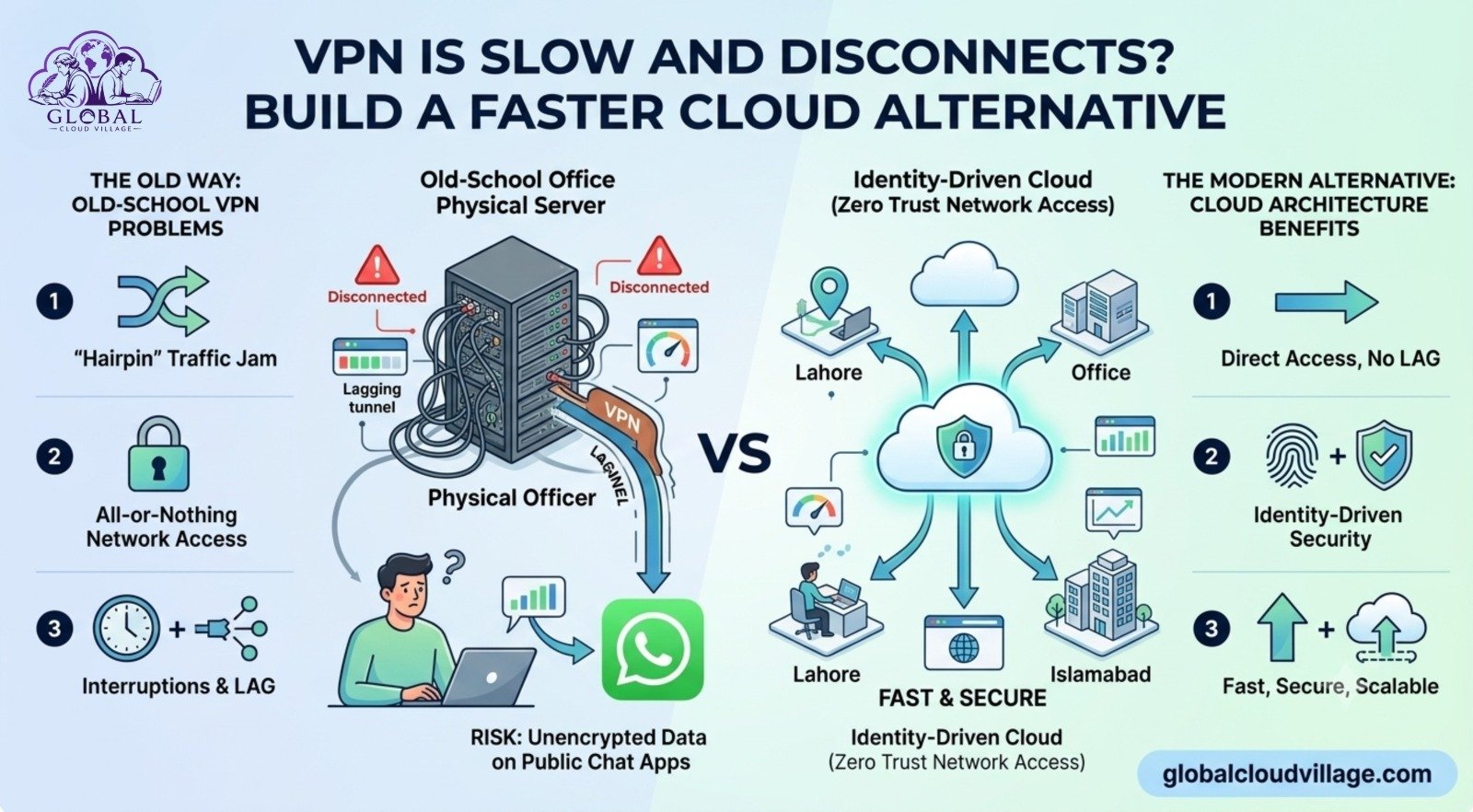
1. The “Hairpin” Traffic Jam
Imagine you are working from Lahore and you want to open an Excel file stored on your company’s physical office server in Islamabad. A VPN forces your computer to build a literal digital tunnel from Lahore to Islamabad, compress the file data, encrypt it, send it through the tunnel, and decrypt it on your screen. If five people try to do this at once, the physical office server’s internet upload pipeline gets completely choked.
[Remote Worker in Lahore] ──(Heavy Encrypted Tunnel)──► [Office Server in Islamabad]
│
(Choked Upload Pipeline)
2. The All-or-Nothing Security Risk
Old-school VPNs act like a physical key to your corporate front door. Once an employee logs into the VPN, they aren’t just accessing one specific file; they are virtually sitting inside your entire internal office network. If a hacker steals an employee’s VPN password, they have a green light to roam freely through every single folder, database, and system you own.
3. Built for Offices, Not the Cloud
VPNs were invented when everyone worked under one physical roof and files lived in a hardware closet down the hall. Today, your team uses Google Workspace, QuickBooks Online, and local servers simultaneously. Forcing all that modern, distributed traffic through a legacy hardware box is like forcing an executive driving on a highway to pass through a single, narrow toll plaza.
The Modern Alternative: Zero Trust Network Access (ZTNA)
Instead of building a slow, unstable tunnel to an office closet, forward-thinking businesses are moving to a Zero Trust cloud model.
Think of a VPN like an ancient castle moat—once you cross the drawbridge, you can walk into any room in the castle. Zero Trust is like a modern hotel equipped with digital keycards. The system checks your ID at every single door, but you move through the hallways instantly without carrying a heavy iron key.
With a Cloud Zero Trust setup:
- Decentralized Storage: Files are securely duplicated or permanently hosted in specialized cloud repositories (like secure corporate Google Drive, OneDrive, or AWS data pools).
- Contextual Verification: The system checks exactly who you are, what device you are using, and where you are logging in from before showing you a single document.
- Direct-to-Cloud Routing: Connections are direct and lightning-fast because data travels straight from the secure cloud data center to the employee’s screen—completely eliminating internal office network bottlenecks.
How to Kill Your VPN in 3 Simple Steps
You do not need a massive IT budget or a total hardware overhaul to modernize your network.
Step 1: Audit and Categorize Your Corporate Data
Look at what your team actually pulls from the office server on a daily basis. 90% of the time, it’s everyday operational files: PDFs, client proposals, Excel sheets, and design images. Move these completely off the physical office server and place them into a secure corporate cloud ecosystem (Google Workspace Shared Drives or Microsoft SharePoint).
Step 2: Implement Identity-Based Access Control
Instead of giving employees a shared or individual VPN login, leverage your cloud provider’s built-in access management controls. Set up rules so that a team member can access the “Finance Folder” only if they log in using their verified corporate email address (name@yourfirm.com) with Multi-Factor Authentication (MFA) enabled.
Step 3: Deploy a Cloud-Native Gateway for Legacy Systems
If you have a legacy desktop software system or local database that absolutely must stay on a physical office computer, do not use a VPN to bridge the network. Use modern, lightweight cloud gateways like Tailscale, Cloudflare Access, or Twingate. These tools don’t create slow network tunnels; they securely stream just that single application interface to your browser instantly.
Real-World Case Study: The Rawalpindi Consultancy
An engineering consultancy based in Rawalpindi with 25 remote draftsmen relied on a hardware VPN to let staff access heavy CAD design files from a central office server.
The disconnects were legendary. Staff were losing hours of drawing progress mid-save. To bypass the lag, engineers started downloading massive files locally to their personal, unsecured laptops, editing them, and uploading them via free file-sharing sites at midnight. The business had zero control over its core intellectual property.
We helped them transition to a cloud-native document architecture over a single weekend.
The Out-of-the-Box Results:
- Instant Access: File opening speeds went from an average of 4 minutes over the VPN to just 3 seconds via the direct cloud repository.
- Zero IT Friction: The daily “VPN is down” support tickets dropped to zero.
- Measurable Savings: The firm saved an estimated 180,000 PKR monthly in lost billable hours previously wasted waiting for connections to reset.
Performance Comparison: VPN vs. Zero Trust Cloud
| Performance Metric | Old-School Hardware VPN | Identity-Driven Zero Trust Cloud |
| Connection Speed | Slow (Limited by office upload speed) | Lightning Fast (Cloud data center backbone) |
| Stability | Fragile (Prone to drops on unstable connections) | Highly Resilient (Handles packet loss seamlessly) |
| Security Perimeter | Network-Wide (Access to everything) | Granular (Access only to authorized files) |
| User Experience | High friction (Requires specialized login clients) | Frictionless (Seamless single sign-on via browser) |
The 3 Frequent Pitfalls to Avoid During Migration
- Moving Broken Folder Structures: Don’t just dump a messy, unorganized 10-year-old office server directory into the cloud. Take the opportunity to clean up user permissions and folder hierarchies before running your data migration.
- Ignoring Device Health Policies: When setting up your Zero Trust parameters, ensure you configure the system to check if the connecting device has basic security updates enabled. A secure login from a malware-infected personal computer still poses a risk.
- Leaving the Old VPN Server Plugged In: Once your data is safely moved to the cloud, completely turn off and unplug the old office VPN hardware. Leaving it running creates an unmonitored back door into your physical office network.
Conclusion: Speed is a Critical Security Feature
When your business technology is slow, lagging, and clunky, your team will inherently find insecure shortcuts to bypass it just to hit their deadlines. A dropping, lagging VPN isn’t just an IT nuisance—it is an operational hazard that actively pushes your staff to leak sensitive data on public channels.
In 2026, working remotely should feel just as fast as sitting right next to the office server. Switching to an identity-driven cloud model gives your team the fluid, uninterrupted speed they need to produce great work, while keeping your company’s intellectual property locked down behind enterprise-grade security.
Frequently Asked Questions About Moving Beyond VPNs
Does Zero Trust mean we completely lose the ability to connect to our physical office hardware?
Not at all. Tools like Tailscale or Cloudflare Access allow you to safely connect to specific physical machines inside your office. The difference is that they don’t open up your entire network like a VPN does; they create a secure, direct, isolated path to just that single machine or application.
How does a Zero Trust cloud model handle sudden internet disconnects?
Modern cloud systems like Google Drive or OneDrive have built-in offline synchronization. If your remote internet drops for a few seconds, you can keep working on your file uninterrupted. The moment your connection returns, the system automatically merges and updates your changes in the background without freezing your screen or dropping an upload session.
Is it difficult to manage file permissions for a changing team without a domain server?
It is actually much simpler. All user management is handled through a central cloud admin web dashboard. When a new team member joins or changes roles, you can instantly add or remove them from specific resource groups (like “Marketing” or “HR”) with a few clicks, instantly updating their access across all company files.
Will our internet bills go up if we move our file storage completely to the cloud?
For your remote staff, internet data usage stays roughly the same or decreases because they are no longer running heavy VPN overhead tunnel protocols. For your central office, your internet bandwidth usage drops drastically because the office server is no longer constantly uploading data to remote users all day long.
Ready to Build a Frictionless Remote Enterprise?
Eliminating slow infrastructure bottlenecks is the first step toward reclaiming your operational momentum and achieving true business automation. Discover the complete blueprint for running a highly profitable, location-independent business without tech frustration.
Get your copy of Global Cloud Village and 4 Day Work Week on Amazon:
About the Author: Global Cloud Village
Global Cloud Village specializes in breaking down complex tech barriers for growing businesses, authors, and independent professionals. We help remote teams replace slow, legacy network hardware with fast, modern, identity-driven cloud workflows that scale seamlessly. Discover our latest operational insights at globalcloudvillage.com.