Power Outage Stopped All Work: Cloud + Internet = Business Continuity
It’s 2 PM. Load shedding hits.
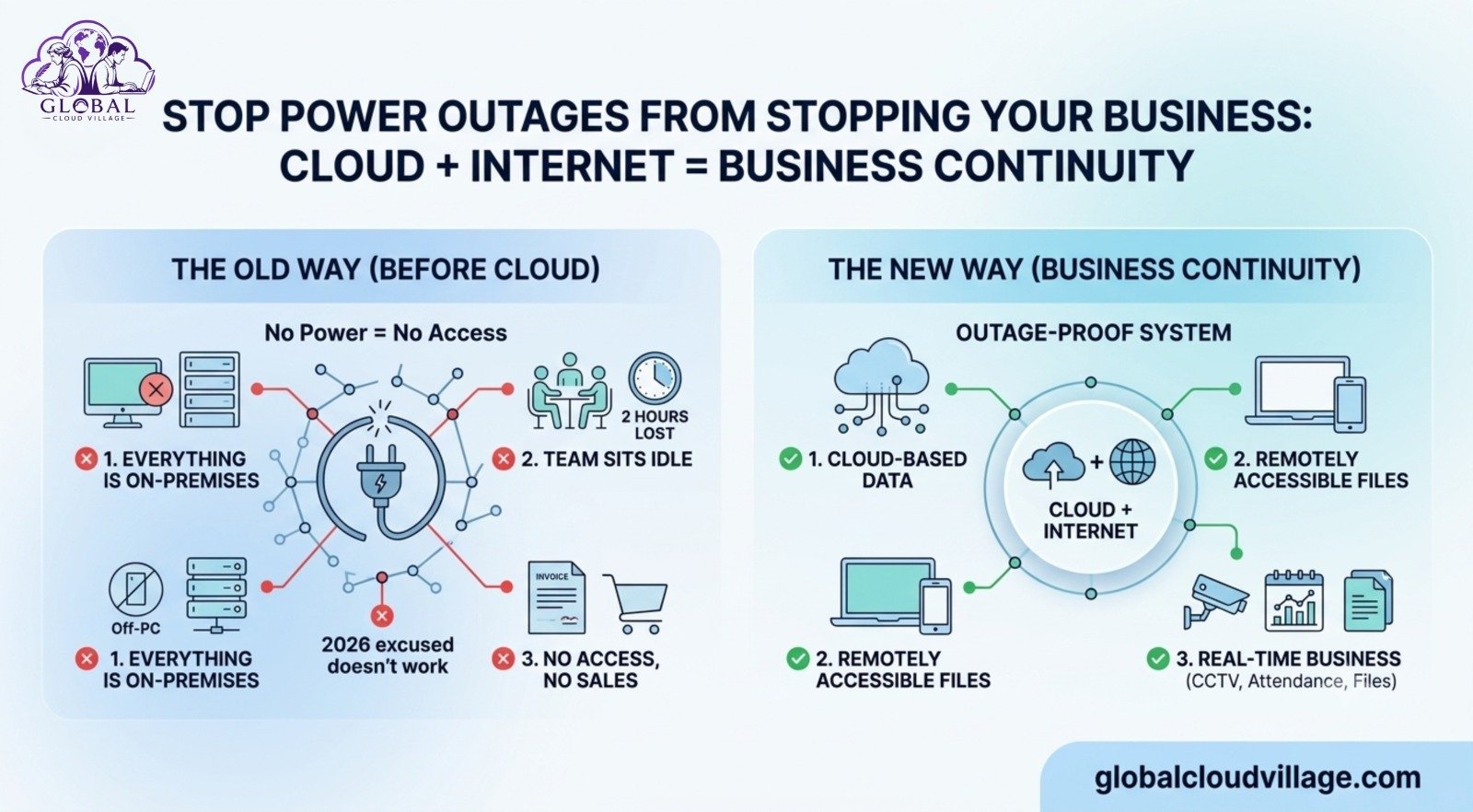
Office lights click off. Routers die. Desktop PCs go black. And with that single click, your entire business grinds to a sudden, painful halt.
No invoices can be issued. No emails can be answered. No one can access critical client files. Sales stop dead in their tracks.
Your team sits around checking their phones for the next two hours, entirely idle. A high-value client calls demanding an update: “Where is my quotation?” You are forced to give the most unprofessional reply a business owner can offer: “Sir, bijli nahi hai (Sir, there is no electricity).”
In 2026, this excuse doesn’t work these days. Why? Because your smartest competitors are working right through the same power outage.
The core problem isn’t the power grid. The problem is your operational architecture: your entire business depends on electricity existing in one single physical building.
Let’s change that. Here is how to make your organization completely outage-proof using the cloud and redundant internet setups within the next seven days.
Why Power Outages Disrupt SMEs Far More Than Large Enterprises
I’ve audited this specific operational vulnerability across manufacturing plants, medical clinics, creative agencies, and retail shops. The breakdown always follows a predictable path:
1. The On-Premises Trap
Your billing software, client interaction histories, master files, and administrative tools are hosted locally on a single office computer. When that specific PC loses power, your entire workforce loses its direction and visibility.
2. Disconnected Backup Networks
When the primary power drops, the main office Wi-Fi router goes down with it. Even if team members want to use mobile data, the transition is slow, clunky, and completely uncoordinated.
3. A Total Lack of a Remote Work Framework
When prolonged blackouts hit, managers often tell staff to just pack up and go home. But once home, employees still cannot accomplish anything because the vital company data remains physically locked behind darkened office doors.
The True Cost: Losing two hours of power routinely translates into four hours of completely lost operational momentum. If this occurs three times a week, your company loses a full working day of productivity every single week.
The Resilient Formula: Cloud + Internet = Absolute Business Continuity
The strategic fix is simple. If your core data and operating applications live securely in the cloud, and your team is equipped with redundant data links, work moves forward effortlessly—even if your physical office building is completely dark.
- The Cloud: Represents your office infrastructure hosted safely on the internet.
- The Internet serves as the digital wire connecting your distributed team to that virtual office.
You do not need to spend 300,000 PKR on a noisy, fuel-guzzling commercial generator. You simply need a smart, 15,000 PKR digital backup plan.
A 5-Step Business Continuity Plan for SMEs
Deploy this cloud framework once, and it will safeguard your business revenue through every subsequent blackout.
Step 1: Migrate Core Operational Workloads to the Cloud
Identify exactly which workflows freeze the moment the lights go out. For 95% of small businesses, it falls into four categories:
| Workflow Type | Legacy Tool (Vulnerable) | Cloud Solution (Outage-Proof) |
| Files & Documents | Local Hard Drives / Server PC | Google Drive / OneDrive |
| Billing & Accounting | Desktop Software / Excel Sheets | QuickBooks Online / Zoho Books |
| Customer Relations | Paper Logs / Standalone Spreadsheets | HubSpot CRM / Zoho CRM |
| Project Tracking | Whiteboards / Verbal Check-ins | ClickUp / Trello / Asana |
Once migrated, these tools can be securely accessed from any laptop, tablet, or smartphone from literally anywhere.
Step 2: Engineer a Redundant “Backup Internet” Pipeline
Never allow your entire workforce to rely on a single local Wi-Fi connection.
- For the Office: Install a dedicated 4G/5G industrial router connected to a compact mini-UPS router battery (averaging ~15,000 PKR total). Equip it with a reliable data SIM from an alternate carrier (e.g., Jazz or Zong). When the main grid fails, the mini-UPS keeps your internet active for up to four hours.
- For the Remote Team: Provide a modest monthly mobile data stipend. Mandate that every employee knows exactly how to activate their smartphone’s mobile hotspot.
The Rule: The moment the primary office Wi-Fi goes down, every team member must transition to their backup mobile data link within two minutes.
Step 3: Configure Native Offline Capabilities
Modern enterprise cloud tools do not require a constant, flawless internet connection to remain functional.
- Google Workspace: Activate the “Available Offline” setting for your primary document directories.
- Cloud CRMs: Ensure employees download the mobile application versions, which feature built-in offline data caching.
- Email Ecosystems: Turn on offline mail caching within Google Chrome or your dedicated mail clients.
Your team can work on their active projects offline during a disruption; the moment their internet connection stabilizes, the applications automatically sync the updates back to the master database.
Step 4: Enforce a Clear “Power Outage SOP”
Without a documented process, people will default to panic or treat an outage as an unexpected break. Distribute a simple, one-page Standard Operating Procedure (SOP):
- Disconnect: If the primary Wi-Fi goes down, switch your laptop immediately to your 4G hotspot.
- Verify: Open your centralized task manager (e.g., ClickUp) to review your active priority queues.
- Execute: Continue processing documents or customer service tasks using offline-cached files if needed.
- Sync: Drop a quick confirmation message in the team’s WhatsApp or Slack group once you are safely back online.
Run a 15-minute operational drill on a Friday afternoon so the entire team can practice transitioning without skipping a beat.
Step 5: Transition to Cloud-Based Communication
If your primary office contact number is tied to a traditional physical landline sitting on a desk, your clients cannot reach you when the office is closed or dark.
Switch your primary customer service lines to a cloud-based communication suite or a verified WhatsApp Business platform mapped to multiple devices. Incoming client calls will route straight to your team’s mobile handsets regardless of where they are physically sitting.
The Strategic Importance of Resilience
Building operational resilience isn’t just an option; it’s a fundamental requirement for market survival.
Data from the World Bank indicates that small businesses across South Asia lose an average of 5% to 7% of their total annual revenue due to recurring power and infrastructure disruptions.
Furthermore, data from global emergency management agencies highlights that 40% of small businesses fail to reopen following severe or prolonged operational disruptions simply because they lacked a basic data continuity plan.
Enterprise corporations spend millions building secondary data centers. As an agile SME, you can capture that exact same level of operational permanence for a fraction of the cost by leaning heavily into cloud infrastructure.
Real-World Case Study: 0 Minutes of Downtime During a 6-Hour Outage
Consider a fast-growing e-commerce and distribution company operating out of Rawalpindi with a team of 12 employees. Every single local power cut completely paralyzed their order processing, leading to severe shipping delays, chargebacks, and frustrated negative reviews.
We re-engineered their operational setup over a five-day sprint:
- Migrated their entire inventory management and order fulfillment tracking onto a secure cloud ERP.
- Equipped each staff member with a portable 4G router and clear hotspot workflows.
- Enabled full offline document synchronization across all company laptops.
The very next month, a major localized grid failure knocked out power to their primary district for six consecutive hours.
The Result: The business suffered zero minutes of operational downtime. The team processed 47 incoming orders seamlessly from their respective locations without a single delay. The owner called me the next morning and noted: “For the first time in ten years of business, a power outage didn’t terrify me.”
Cost Comparison: Cloud Resilience vs. Legacy Generators
Let’s look at the actual financial investment required to secure your business workflows:
| Operational Approach | Initial Capital Expense | Ongoing Monthly Cost | Operational Flexibility |
| Commercial Generator Setup | 300,000+ PKR | High Fuel + Maintenance Costs | Fixed to one single office building |
| Cloud + Redundant Internet | ~15,000 PKR (One-time) | ~2,000 PKR / person data stipend | Works anywhere (Office, Home, Travel) |
The 3 Frequent Blindspots to Avoid
- Failing to Run Practice Drills: Never wait for a major blackout to discover that an employee forgot how to configure their data hotspot. Test your backup connections regularly.
- Restricting Admin Access Profiles: If only the business owner holds the administrative login details for your cloud billing software, the workflow remains bottlenecked. Deploy secure, role-based user access for your financial team.
- Leaving Your Clients in the Dark: If a major disruption occurs, configure your cloud email systems to send automated out-of-office replies or update your customer support signatures to direct urgent queries to your mobile-responsive channels.
Conclusion: Stop Letting Load Shedding Run Your Revenue
Power disruptions are a frustrating reality of doing business locally, but letting an outage completely paralyze your business growth is a conscious choice.
A cloud-based Business Continuity Plan for SMEs ensures that your corporate directories remain completely secure online, your primary billing tools stay functional, and your workforce retains the ability to execute their tasks from any location on earth.
The next time the local grid goes down, let your physical office go dark while your business moves forward. Your sales reps can keep closing deals, your finance team can continue issuing invoices, and your clients will receive professional, lightning-fast replies without delay.
You do not need an uninterrupted supply of grid electricity to run a modern, 24/7 business anymore. You simply need a resilient system. Build your cloud continuity framework this week, and secure your pipeline before the next blackout hits.
Frequently Asked Questions About SME Business Continuity
How secure is our confidential client data when staff work via mobile hotspots?
It is highly secure, provided you enforce standard data hygiene. By utilizing built-in device encryption, requiring strong user passwords, and mandating 2-Step Verification (2FA) across every single corporate cloud login, your data remains far safer than it ever would sitting on an unencrypted office desktop PC.
What happens if a mobile network tower also loses power during an extended blackout?
This is why we recommend setting up a dual-carrier data policy. If your primary office internet uses a specific telecom provider, ensure your employees’ mobile data stipends are mapped to an alternate network (e.g., mixing Jazz and Zong infrastructure). It is incredibly rare for multiple independent cellular networks to experience simultaneous localized tower failures.
Can heavy accounting and ERP applications run smoothly over a standard 4G mobile data connection?
Yes, absolutely. Modern cloud platforms like QuickBooks Online, Zoho, and HubSpot are explicitly engineered and optimized to transfer incredibly lightweight text data packets. They do not require high-bandwidth fiber connections to refresh dashboards, generate invoices, or update client profile registries.
How do we track employee productivity if an outage forces them to finish their shift from home?
Cloud-native productivity applications (like ClickUp, Trello, or Jira) automatically generate real-time activity and timestamp logs. You can easily view when a task was moved, when an invoice was compiled, or when a client communication was logged, allowing you to manage your team based on tangible output rather than physical desk presence.
Ready to Outage-Proof Your Business Operations?
Transitioning your workflows away from physical infrastructure limitations is a core pillar of achieving absolute strategic freedom. The complete corporate continuity methodology includes mobile-SOP templates, offline-sync checklists, and secure data access blueprints.
Get your copy of Global Cloud Village and 4 Day Work Week on Amazon:
About the Author: Global Cloud Village
Global Cloud Village crafts high-impact, real-world blueprints focused on business architecture, digital automation, and long-term scaling strategies. We empower forward-thinking entrepreneurs and growing small businesses to break free from physical bottlenecks and transition into highly profitable, cloud-first enterprises. Learn more at globalcloudvillage.com.