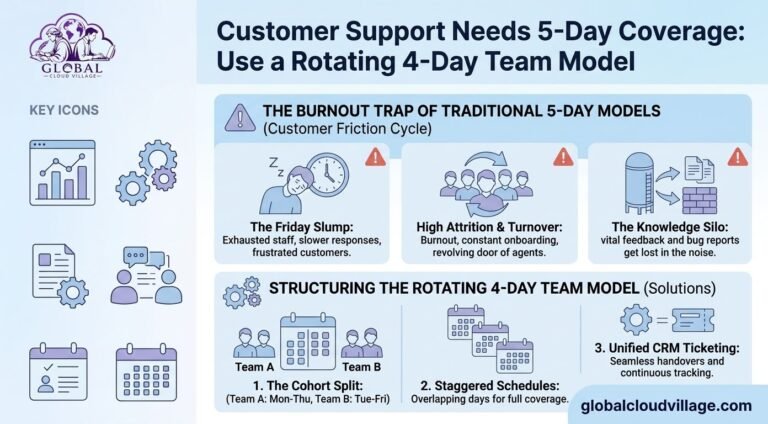
Rotating 4-Day Team Model: How to Maintain 5-Day Customer Support Coverage
Chloe, the head of customer success at a rapidly growing SaaS company, was concerned about what a four-day workweek would mean for her support operation.
Management wanted to introduce a compressed 32-hour schedule to address employee fatigue and improve the sustainability of the team’s workload.
But there was one major problem.
Customers still expected support throughout the normal Monday-to-Friday business week.
“If everyone moves to Monday through Thursday, who handles urgent support tickets on Friday?” Chloe asked during an executive meeting. “What happens to billing escalations and customers who need assistance at the end of the week?”
It is a legitimate concern for any customer-facing organization.
A four-day workweek does not automatically mean that every employee must have the same day off.
Instead, businesses can use a Rotating 4-Day Team Model that distributes non-working days across different team members while maintaining appropriate customer coverage.
The key is to treat the four-day workweek as a staffing and workflow design problem, not simply as a company-wide shutdown.
Why Traditional Support Schedules Can Create Problems
Customer support teams often operate under continuous pressure.
Agents are expected to respond quickly, resolve issues efficiently, document conversations, and manage difficult customer interactions.
When workload is poorly distributed, several problems can appear.
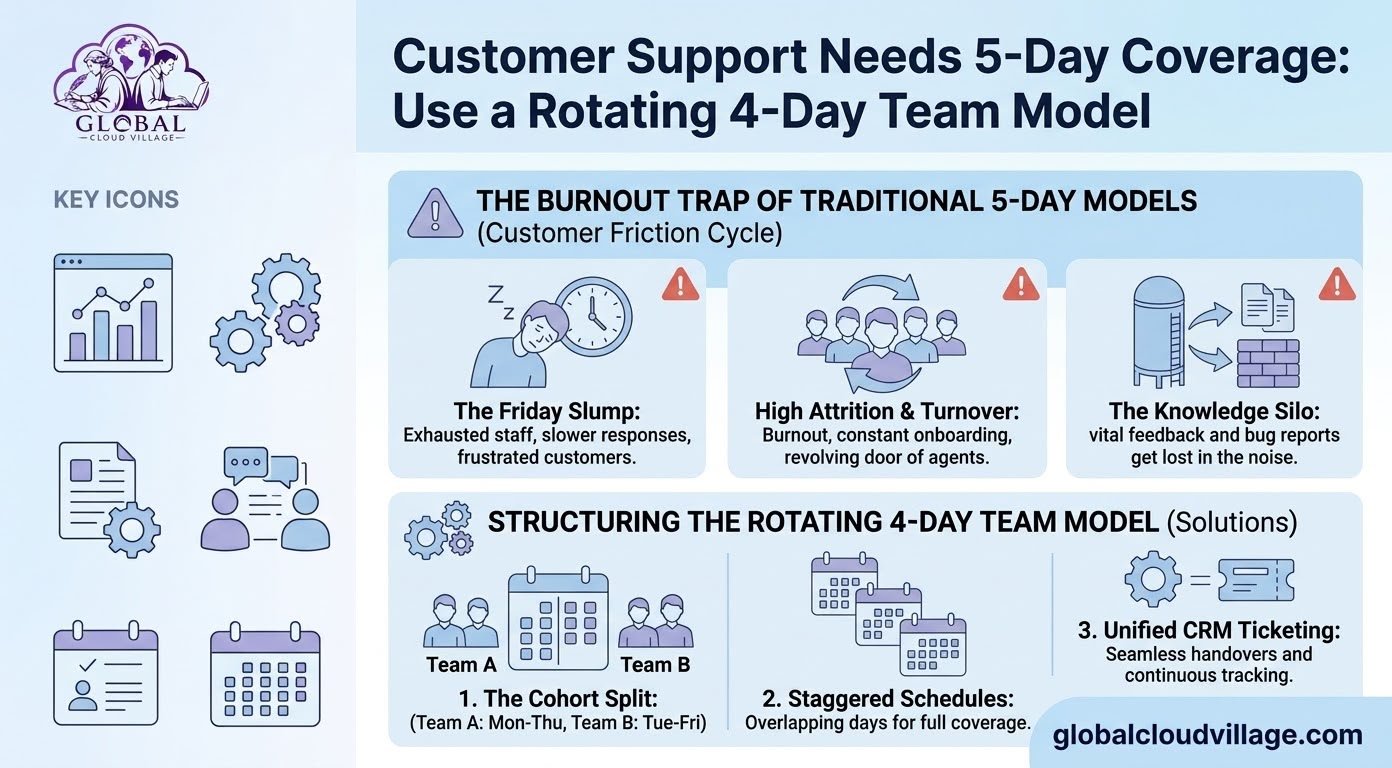
End-of-Week Fatigue
Long working weeks can contribute to employee fatigue. Tired agents may find it more difficult to maintain the same level of concentration and patience throughout every customer interaction.
Employee Turnover
Customer support can be demanding. Poor workload management may contribute to dissatisfaction, absenteeism, and employee turnover.
Knowledge Gaps
When support teams are moving quickly between tickets, important customer feedback, product issues, and escalation details can be missed or poorly documented.
Inconsistent Coverage
A rigid schedule can also create unnecessary pressure when customer demand varies across the week.
The solution is not simply to add more employees.
Businesses should first examine when customers need support and how available staffing can be distributed around those demand patterns.
Structuring the Rotating 4-Day Team Model
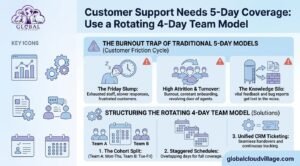
A Rotating 4-Day Team Model divides a customer support department into different scheduling groups.
Instead of everyone taking the same day off, team members work different four-day schedules.
There are several ways to design this system.
1. Cohort Split: Monday-Thursday and Tuesday-Friday
One straightforward structure is to create two support cohorts.
Pod Alpha
Works Monday through Thursday.
Pod Beta
Works Tuesday through Friday.
This creates overlapping coverage from Tuesday through Thursday, while Monday and Friday have coverage from one cohort.
The exact staffing ratio should be determined by actual ticket volume.
For example, if Friday ticket volume is consistently low, a smaller Friday team may be sufficient.
If Friday is one of the busiest support days, the organization may need a larger Friday cohort or a different scheduling arrangement.
The schedule should therefore be based on customer demand rather than an assumption that a 50/50 split will work for every company.
2. Centralized CRM and Ticket Management
A rotating schedule becomes much easier to manage when every agent works from the same source of information.
A centralized CRM or help desk system can provide visibility into:
- Open tickets
- Ticket priority
- Customer history
- Previous communication
- Assigned agents
- Internal notes
- Escalations
- Service-level deadlines
When one cohort finishes its working period, the next cohort should be able to see exactly what remains outstanding.
This reduces dependence on informal emails, spreadsheets, or verbal handoffs.
The goal is simple:
Every support agent should be able to understand the status of a customer issue without having to find the previous agent personally.
3. Structured Shift Handoffs
A handoff process is essential when teams operate on different schedules.
Before finishing a shift, agents should document important information such as:
- Current issue
- Actions already taken
- Customer expectations
- Outstanding tasks
- Next recommended action
- Escalation status
- Relevant deadlines
A standardized digital handoff can then become part of the ticket record.
This creates continuity between cohorts and reduces the risk of information being lost between shifts.
Using Automation to Protect Support Capacity
A four-day support schedule can become difficult when agents spend too much time answering repetitive questions.
Automation can help reduce this burden.
Examples include:
Knowledge Bases
Customers can find answers to common questions without contacting an agent.
Automated Ticket Routing
Incoming tickets can be categorized and assigned according to topic, priority, customer type, or other rules.
Chatbots and Virtual Assistants
Automated systems can handle simple questions or direct customers toward relevant resources.
Automated Notifications
Customers can receive confirmations when tickets are created, updated, assigned, or resolved.
Automation should not be viewed as a replacement for human support.
Its primary role is to reduce repetitive work so trained support specialists can focus on issues that require investigation, judgment, and empathy.
How Chloe Restructured the Support Desk
Chloe decided that the four-day workweek should be tested as an operational redesign rather than simply changing everyone’s schedule.
She began by reviewing:
- Ticket volumes by day
- Peak support hours
- Ticket categories
- Escalation patterns
- Response times
- Resolution times
- Staffing levels
Her 12-person support team was then divided into scheduling cohorts.
The team also introduced a centralized ticketing workflow and documented handoff procedures.
Instead of relying on memory or informal communication, agents were expected to leave clear notes on unresolved customer issues before completing their working period.
The organization then monitored performance during the pilot.
Rather than assuming the new model would automatically improve results, Chloe tracked operational indicators such as:
- First-response time
- Resolution time
- Customer satisfaction
- Ticket backlog
- Escalation volume
- SLA performance
- Employee feedback
- Absence and turnover trends
This gave management a practical way to determine whether the new staffing structure was meeting both customer and employee needs.
Step-by-Step: Implementing a Rotating 4-Day Support Model
If you manage a customer-facing team, use the following framework to evaluate a rotating schedule.
1. Analyze Ticket Volume
Start with your existing support data.
Identify:
- Busiest days
- Busiest hours
- Common ticket categories
- High-priority periods
- SLA-sensitive requests
- Escalation patterns
Your schedule should reflect actual demand.
2. Design Your Cohorts
Create scheduling groups based on the required coverage.
A Monday-Thursday and Tuesday-Friday model can work for some organizations, but other companies may benefit from different combinations.
For example, businesses with weekend demand may need rotating schedules that include Saturday or Sunday coverage.
The schedule should reflect your actual service commitments.
3. Define Minimum Coverage
Determine the minimum number of agents required for each support period.
Consider:
- Ticket volume
- Average handling time
- Agent specialization
- Customer priority
- SLA requirements
- Escalation procedures
Do not assume that the same number of agents is necessary every day.
4. Standardize Shift Handoffs
Create a consistent process for transferring unresolved issues between cohorts.
Every handoff should provide enough context for the next agent to continue the case without repeating unnecessary investigation.
5. Automate Repetitive Requests
Identify common low-complexity tickets that can be handled through:
- Knowledge bases
- FAQs
- Automated workflows
- Chatbots
- Self-service portals
The goal is to reduce avoidable workload.
6. Protect SLA Performance
If your business operates under formal service-level agreements, map staffing coverage against those commitments.
Track whether the rotating model affects:
- Response times
- Resolution times
- Escalation times
- Priority ticket handling
If performance begins to deteriorate, adjust the schedule before customer experience is affected.
What Happens During a Friday Support Spike?
One of the biggest challenges in a rotating model is an unexpected increase in ticket volume.
A normal Friday may have relatively low demand, but an incident, product release, billing problem, or technical outage can suddenly change the situation.
Your support operation should therefore have an escalation plan.
Possible mechanisms include:
Queue Threshold Alerts
Set automated alerts when the number of unresolved or high-priority tickets exceeds a predefined threshold.
On-Call Escalation
For genuinely critical incidents, designate an appropriate escalation contact.
Cross-Trained Agents
Train selected employees to support multiple categories so they can assist during unusual demand.
Priority-Based Routing
Automatically prioritize critical customer issues over routine requests.
Incident Response Procedures
Create a documented process for major service incidents so the organization knows who takes ownership and how customers are informed.
The objective is not to eliminate every possible spike.
It is to ensure the organization knows what to do when one occurs.
How CRM and Cloud Systems Support Rotating Teams
Technology plays an important role in making a rotating support model practical.
A cloud-based support environment can centralize information and provide visibility across different working schedules.
Useful capabilities include:
- Shared ticket queues
- Automated routing
- Customer profiles
- Internal notes
- SLA timers
- Escalation alerts
- Reporting dashboards
- Knowledge bases
- Customer portals
- Automated notifications
For larger organizations, CRM and ERP integration may also provide additional visibility into customer accounts, orders, billing, inventory, or other operational information.
The exact technology stack will depend on the organization’s size and requirements.
The important principle is that the system should provide a reliable source of truth for the support team.
Maintaining Team Cohesion With Rotating Schedules
Different working schedules can create a new challenge: team members may not see each other every day.
That makes intentional communication important.
Use overlapping working days for:
- Team meetings
- Training
- Process reviews
- Knowledge sharing
- Coaching
- Product updates
- Performance discussions
Tuesday through Thursday may provide useful overlap in a Monday-Thursday and Tuesday-Friday structure.
However, businesses should avoid filling every overlap period with meetings.
The purpose of overlap is to create useful collaboration while protecting the focused time needed for customer support.
Common Mistakes With a Rotating 4-Day Team Model
Mistake 1: Assuming Every Day Needs the Same Staffing
Customer demand is rarely identical every day.
Use ticket data to determine appropriate staffing levels.
Mistake 2: Relying on Verbal Handoffs
If critical customer information exists only in conversations between agents, the process becomes fragile.
Document important information inside the ticketing system.
Mistake 3: Ignoring SLA Requirements
A rotating schedule must be compatible with contractual and operational commitments.
Review your service-level requirements before implementation.
Mistake 4: Over-Automating Customer Support
Automation is useful for repetitive requests, but complex customer issues still require human judgment.
Use technology to support agents rather than remove necessary human interaction.
Mistake 5: Changing the Schedule Without Testing It
Start with a controlled pilot where possible.
Measure performance, collect employee feedback, review customer feedback, and make adjustments before scaling the model.
Frequently Asked Questions About Rotating 4-Day Support Models
How does a Rotating 4-Day Team Model maintain five-day coverage?
Different groups of employees take different days off. For example, one cohort may work Monday through Thursday while another works Tuesday through Friday. This creates coverage across the full Monday-to-Friday period, subject to appropriate staffing levels.
Will a rotating schedule reduce customer support quality?
Not necessarily. The outcome depends on staffing levels, workload, handoffs, technology, training, and customer demand. The model should be measured using service and customer-experience metrics.
How do we handle unexpected ticket spikes?
Use automated queue alerts, priority routing, documented escalation procedures, and appropriate backup or on-call arrangements for critical situations.
Can small businesses use a rotating 4-day support model?
Potentially, although smaller teams have less scheduling flexibility. Businesses should first calculate their minimum coverage requirements and determine whether a rotating schedule can meet them.
What CRM features are important?
Useful features include centralized ticket management, automated routing, SLA tracking, internal notes, shared visibility, notifications, reporting, and workflow automation.
Popular platforms include Zendesk and HubSpot, although the right platform depends on your organization’s needs.
How should support handoffs work?
Use standardized digital notes inside the ticketing system. Agents should record the current issue, actions taken, customer expectations, outstanding tasks, and next steps.
Should every employee have the same day off?
Not necessarily. A rotating model works by distributing non-working days across cohorts. The best schedule depends on customer demand, staffing requirements, employee preferences, and contractual service commitments.
Conclusion: Build Coverage Through Better Workforce Design
A four-day workweek does not have to mean closing the customer support desk for an additional day.
With the right staffing structure, businesses can distribute working days across different cohorts while maintaining appropriate customer coverage.
A Rotating 4-Day Team Model can provide a framework for doing this.
But the schedule itself is only one part of the solution.
Successful implementation also requires:
- Accurate ticket-volume analysis
- Appropriate staffing levels
- Centralized ticket management
- Structured handoffs
- Automation for repetitive requests
- Clear escalation procedures
- SLA monitoring
- Ongoing performance measurement
The goal is not simply to give employees an additional day away from work.
It is to build a support operation that uses available staffing more intelligently while maintaining reliable service.
Design around customer demand. Document every handoff. Automate repetitive work. Measure the results.
Ready to Optimize Your Team’s Output?
A sustainable customer support model requires more than changing the weekly schedule.
It requires better workforce planning, reliable cloud systems, clear escalation procedures, and measurable service standards.
Discover more practical strategies for modern business productivity in Global Cloud Village and 4 Day Work Week.
You can also explore the author’s work through the Amazon Author Profile.
About the Author
Global Cloud Village translates complex digital technology systems into clear, human-centric strategies for growing SMEs, founders, and industry leaders.
The platform explores cloud technology, automation, digital transformation, productivity, data-driven management, and modern workplace strategies that help businesses replace fragmented processes with scalable systems.