KPI Dashboard Setup: How to Track Productivity in 4 Days Not 5
When Elena, the director of operations at a growing digital services firm, moved her team to a four-day, 32-hour workweek, her middle managers became concerned.
The problem was not the three-day weekend.
The problem was visibility.
Managers were accustomed to measuring productivity through office presence, working hours, quick responses, meetings, and visible activity. Once the company removed one working day, those traditional measurements became much less useful.
Some managers began sending more status requests. Others monitored chat activity more closely. One even suggested employee monitoring software to determine whether people were staying productive during the compressed schedule.
Elena rejected the surveillance approach.
Instead, she realized that the company had a measurement problem.
The managers did not necessarily need to see employees working. They needed reliable information showing whether important work was being completed.
That required a shift from monitoring activity to measuring outcomes.
The solution was a structured KPI Dashboard Setup that connected business performance, project delivery, workflow efficiency, and team capacity.
Why Traditional Productivity Metrics Stop Working
For decades, many businesses have used simple indicators to estimate employee productivity.
These include:
- Hours worked
- Office attendance
- Email responsiveness
- Meeting attendance
- Online status
- Time spent on individual tasks
These measurements can provide context, but they do not necessarily show business output.
An employee can spend eight hours at a desk without completing an important deliverable. Another employee may complete a high-value project in six focused hours.
The difference becomes more obvious when a company moves from five working days to four.
A four-day workweek reduces available working time. That makes unnecessary meetings, manual administration, repeated communication, and inefficient approvals more visible.
Businesses therefore need a better approach.
Instead of asking:
“How long was everyone working?”
Managers should ask:
“What important outcomes were delivered?”
This is where KPI dashboard setup becomes valuable.
What Is a KPI Dashboard Setup?
A KPI Dashboard Setup is a centralized system for monitoring the business metrics that matter most.
Instead of collecting information manually from spreadsheets, emails, project management platforms, CRM systems, and financial software, businesses can bring important performance indicators into one reporting environment.
A well-designed dashboard can show:
- Completed work
- Project milestones
- Sales performance
- Customer response times
- Revenue-related activity
- Workflow bottlenecks
- Pending approvals
- Team capacity
- Quality indicators
- Customer satisfaction
The objective is not to create a dashboard containing dozens of numbers.
The objective is to create a clear operational view that helps managers make better decisions.
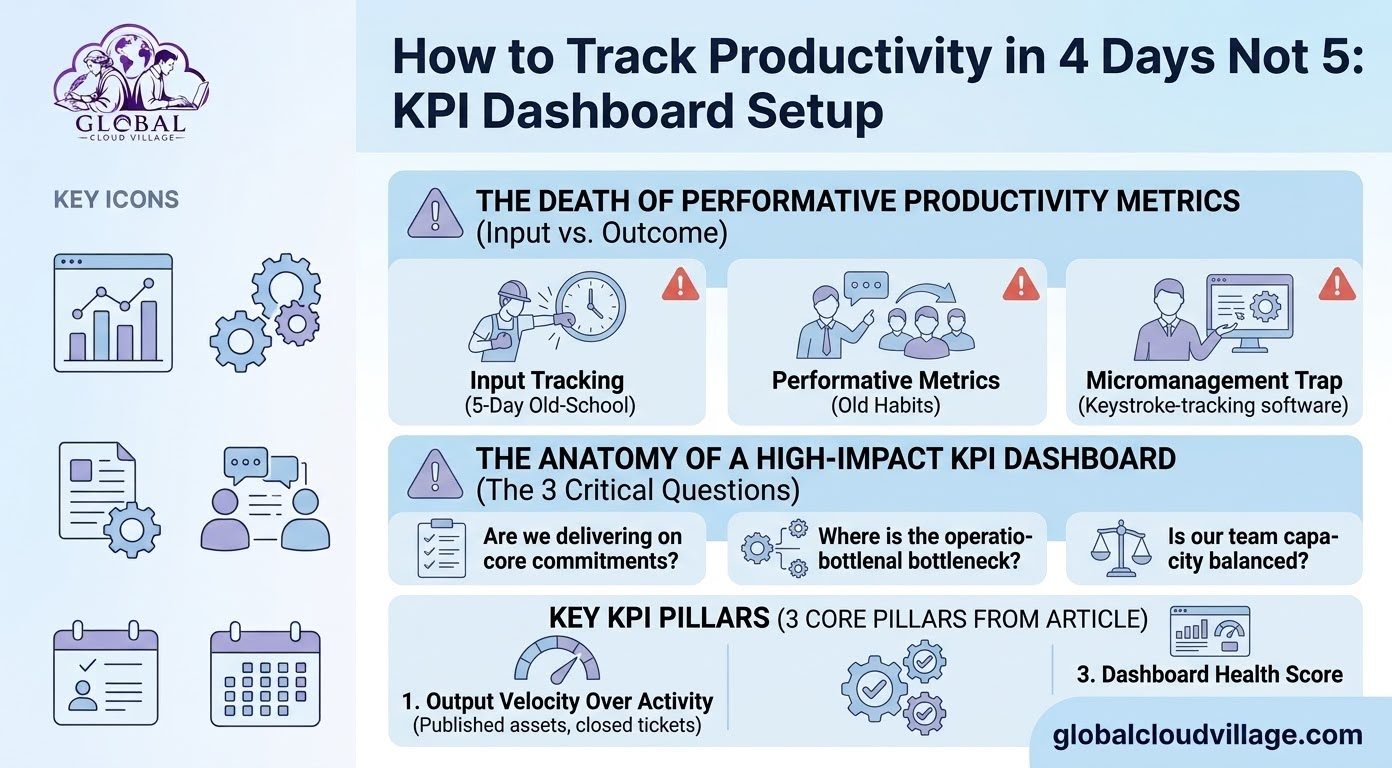
For a four-day workweek, the dashboard should answer three questions:
- Are we delivering our commitments?
- Where is work getting delayed?
- Is team capacity being used sustainably?
The Three Pillars of an Effective KPI Dashboard
1. Measure Output Instead of Activity
The first principle of KPI dashboard setup is to measure meaningful output.
Different departments require different KPIs.
For example, a marketing team may track:
- Published campaigns
- Approved content
- Qualified leads
- Campaign performance
- Organic traffic growth
A development team may track:
- Completed tickets
- Product releases
- Bug resolution
- Deployment frequency
- Sprint completion
A client services team may track:
- Customer response time
- Ticket resolution
- Client satisfaction
- Project milestone completion
- On-time delivery
The objective is not to create a universal productivity formula.
Each department should have KPIs connected to its actual responsibilities.
2. Track Workflow Efficiency and Friction
A useful dashboard should not only show what has been completed.
It should also show where work is getting stuck.
Consider an approval process.
A team may complete a project quickly, but the final deliverable could remain waiting for approval for two days.
The employees appear productive.
The workflow is not.
Useful friction metrics include:
- Approval time
- Task aging
- Waiting time
- Rework rate
- Number of overdue tasks
- Handoff delays
- Unresolved customer requests
These metrics help managers identify operational problems before they become major delivery issues.
3. Monitor Capacity and Workload
A four-day workweek requires realistic workload management.
If employees have 32 working hours available, managers cannot continuously assign work as though the team still has unlimited capacity.
A KPI dashboard can help visualize:
- Assigned workload
- Available capacity
- Overdue tasks
- Project commitments
- Employee allocation
- Department workload
For example, if one employee consistently has more work assigned than their available capacity while another has significant unused capacity, management has an opportunity to redistribute work.
The goal is not to maximize every employee’s workload.
The goal is to use available capacity effectively without creating a cycle of permanent overload.
KPI Dashboard Setup for Different Departments
One of the biggest mistakes businesses make is using the same productivity metrics for every department.
Different roles create value in different ways.
Marketing
A marketing dashboard could track:
- Qualified leads
- Campaign launches
- Cost per acquisition
- Conversion rate
- Organic traffic
- Content production
- Revenue attributed to campaigns
Sales
A sales dashboard could include:
- New opportunities
- Qualified leads
- Conversion rate
- Sales pipeline value
- Proposal activity
- Average sales cycle
- Closed revenue
Customer Support
Important indicators could include:
- First response time
- Resolution time
- Open tickets
- Customer satisfaction
- Escalation rate
- First-contact resolution
Development and Technology
Useful metrics may include:
- Completed development tasks
- Sprint completion
- Bug resolution
- Deployment frequency
- Critical incidents
- Release timelines
Professional Services
A professional services business could track:
- Project milestones
- Client satisfaction
- On-time delivery
- Billable utilization
- Project profitability
- Outstanding approvals
The right KPI depends on the business model and the employee’s actual responsibilities.
How Elena Restored Management Confidence
Elena decided that her company needed a centralized KPI dashboard connected to its cloud ERP and project management environment.
Before implementation, managers relied heavily on meetings and individual updates.
After implementation, they could see project health and operational progress in one place.
Elena also changed the management philosophy.
Instead of asking managers to monitor employee activity, she asked them to focus on:
- Removing bottlenecks
- Balancing workloads
- Clarifying priorities
- Supporting employees
- Monitoring delivery
- Identifying risks
The dashboard became a management tool rather than a surveillance tool.
This distinction is important.
A KPI dashboard should help managers understand the business.
It should not become a mechanism for constantly monitoring employees.
Step-by-Step KPI Dashboard Setup for a 4-Day Workweek
Step 1: Audit Your Existing Metrics
Start by listing every productivity metric currently being used.
Separate them into two categories:
Activity metrics
- Hours online
- Number of meetings
- Emails sent
- Chat responses
- Time at desk
Outcome metrics
- Completed projects
- Sales generated
- Customer satisfaction
- Resolved tickets
- Delivered milestones
- Revenue
- Quality
Do not automatically eliminate activity metrics. Some can provide useful context.
However, outcome metrics should have greater importance when evaluating productivity.
Step 2: Identify Your Critical Business Outcomes
Ask what success actually means for each department.
For example:
Sales: Generate qualified opportunities and revenue.
Marketing: Generate qualified demand and measurable campaign results.
Customer service: Resolve customer issues quickly and effectively.
Development: Deliver reliable product improvements.
Operations: Complete workflows accurately and on time.
These outcomes should become the foundation of your KPI dashboard.
Step 3: Define Baseline Performance
Before changing to a four-day workweek, understand current performance.
Record your existing:
- Delivery times
- Sales results
- Customer satisfaction
- Project completion
- Support response times
- Error rates
- Revenue
- Administrative workload
This gives management a baseline for comparison.
Without a baseline, it becomes difficult to determine whether performance has actually improved or declined.
Step 4: Centralize Your Data
A useful KPI dashboard requires reliable data.
Connect relevant systems where possible, including:
- CRM
- ERP
- Project management
- Customer support
- Finance
- Marketing platforms
- Analytics tools
The goal is to reduce manual reporting.
When managers spend hours preparing reports, the dashboard itself becomes another administrative burden.
Step 5: Create Role-Specific KPIs
Avoid creating one giant productivity score for everyone.
Instead, define a small group of meaningful KPIs for each role or department.
A practical dashboard may contain:
3 to 7 core KPIs per department
This keeps the system focused and easier to interpret.
Step 6: Set Realistic Four-Day Targets
Do not simply take five-day targets and force employees to achieve them in four days.
Review whether the workload is realistic.
Ask:
- Which tasks can be automated?
- Which meetings can be removed?
- Which processes can be simplified?
- Which work can be delegated?
- Which priorities can be eliminated?
- Which deadlines need adjustment?
The four-day workweek should be supported by better prioritization, not simply increased pressure.
Step 7: Train Managers to Read the Dashboard
Technology alone will not change management behavior.
Managers need to understand how to use the information.
When a KPI falls below target, the first question should not be:
“Why aren’t you working harder?”
A better question is:
“What is preventing this outcome from being achieved?”
The issue could be:
- Excessive workload
- Poor project planning
- Missing information
- Approval delays
- Technical problems
- Unclear priorities
- Insufficient resources
The dashboard should help managers diagnose the problem.
Avoid Turning KPIs Into Employee Surveillance
A KPI dashboard can improve transparency, but poor implementation can create distrust.
Businesses should avoid turning every metric into an employee ranking system.
For example, measuring the number of emails sent does not necessarily demonstrate productivity.
Neither does measuring how frequently someone appears online.
Employees may respond to poorly designed metrics by optimizing for the number rather than the actual business outcome.
This is known as metric gaming.
The solution is to use balanced KPIs.
For example, customer support should not be measured only by the number of tickets closed. Combine volume with quality indicators such as customer satisfaction and resolution effectiveness.
The same principle applies across the organization.
Measure what matters, not what is easiest to count.
How to Prevent KPI Gaming
A good KPI dashboard should combine multiple dimensions of performance.
For example:
Quantity + Quality + Business Impact
Instead of measuring only the number of articles published, a marketing team could track content production alongside traffic, engagement, qualified leads, or other relevant business outcomes.
Instead of measuring only tickets closed, customer service teams can combine resolution volume with response time and customer satisfaction.
This creates a more balanced picture of performance.
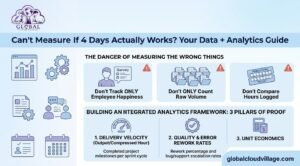
How to Measure a Successful 4-Day Workweek
A successful four-day workweek should not be judged by one number.
Track several dimensions over time.
Productivity
Are important deliverables being completed?
Quality
Are errors, rework, and customer complaints increasing?
Customer Experience
Are response times and satisfaction remaining stable?
Financial Performance
Is the business maintaining or improving important revenue and profitability indicators?
Team Capacity
Are employees consistently overloaded?
Operational Efficiency
Are unnecessary meetings, manual processes, and approval delays decreasing?
A dashboard that combines these dimensions gives management a much clearer picture than hours worked alone.
Common KPI Dashboard Mistakes
Tracking Too Many KPIs
A dashboard containing 50 metrics can create more confusion than clarity.
Focus on the numbers that influence decisions.
Using Vanity Metrics
A number can look impressive without having meaningful business value.
Always ask:
“What decision will we make based on this metric?”
If there is no clear answer, the metric may not belong on the main dashboard.
Changing Targets Too Frequently
Teams need consistency.
If targets change every week, employees cannot understand what good performance looks like.
Review KPIs regularly, but avoid unnecessary changes.
Ignoring Data Quality
Incorrect or incomplete data can make a sophisticated dashboard useless.
Before relying on a KPI, confirm where the data comes from and how frequently it is updated.
Using KPIs as Punishment
KPIs should help identify problems and improve operations.
If every missed target immediately becomes a disciplinary issue, employees may hide problems instead of reporting them.
A healthy KPI culture encourages transparency.
Conclusion: Trust the Data, Not the Clock
A four-day workweek changes the way businesses need to think about productivity.
When working hours decrease, relying on attendance, online status, meeting participation, or hours worked becomes less useful.
Businesses need visibility into actual outcomes.
A well-designed KPI Dashboard Setup gives managers that visibility by connecting output, workflow efficiency, capacity, quality, and business performance.
The goal is not to watch employees more closely.
The goal is to understand the business more clearly.
When managers can see where work is progressing, where it is blocked, and where capacity is being stretched, they can make better decisions without unnecessary micromanagement.
The modern workplace does not need more surveillance.
It needs better information.
Track outcomes. Remove friction. Protect capacity. Trust the data.
Frequently Asked Questions About KPI Dashboard Setup
How do we measure productivity for creative roles in a four-day workweek?
Focus on completed deliverables, quality standards, project milestones, campaign outcomes, and other role-specific results rather than simply measuring hours spent working.
Can employees manipulate KPI dashboards?
Poorly designed KPIs can encourage metric gaming. To reduce this risk, combine volume metrics with quality, customer satisfaction, and business impact indicators.
What software can be used for KPI dashboard setup?
Businesses can combine cloud ERP platforms, CRM systems, business intelligence tools, analytics platforms, and project management software. The right combination depends on the company’s processes, data sources, budget, and reporting requirements.
Should every employee have the same KPIs?
No. KPIs should reflect the responsibilities and expected outcomes of each role or department.
How many KPIs should a dashboard have?
There is no universal number, but businesses should avoid overwhelming users with unnecessary metrics. A focused group of core KPIs for each department is generally easier to understand and act upon.
What should managers do when a KPI falls below target?
Use the KPI as a diagnostic signal. Investigate whether the problem comes from workload, unclear priorities, process friction, resource constraints, poor data, or another operational issue before assuming that employees simply need to work longer.
Can a KPI dashboard replace management?
No. A dashboard provides information, but managers still need to interpret the information, make decisions, support employees, resolve bottlenecks, and adjust business processes.
Ready to Optimize Your Team’s Output?
Eliminating operational friction and improving visibility can help businesses build a more sustainable four-day workweek.
If your managers are still relying on spreadsheets, status meetings, online activity, or manual reporting to understand performance, it may be time to build a more connected measurement system.
Discover more practical strategies for modern business operations in Global Cloud Village and 4 Day Work Week.
You can also explore the author’s work through the Amazon Author Profile.
About the Author
Global Cloud Village translates complex digital technology systems into clear, human-centric strategies for growing SMEs, founders, and industry leaders.
The platform explores cloud technology, automation, digital transformation, productivity, data-driven management, and modern workplace strategies that help businesses replace fragmented processes with scalable systems.